iZotope RX 6 Elements + Reverb Exclusive Preset Pack
Nuovo prezzo$19
Download istantaneo
Lo strumento è stato venduto
Vedi strumenti simili di altri venditori Reverb
Pubblicato:più di un mese fa
Visualizzazioni:3.637
Salvataggi:14

Chicago, IL, Stati Uniti
I nostri utenti valutano Reverb
RX 6 Elements - Save the perfect take with this post-production magic wand including Reverb exclusive presets.
What it is:
The baby brother of iZotope’s RX 6 Standard.
How we use it:
For most all audio remedies.
Why it’s cool:
RX 6 Elements is wonderfully easy to use, but don’t let that diminish its capabilities.Introducing RX 6 Elements
RX is the industry standard audio repair tool that’s been used on countless albums, movies, and TV shows to restore damaged, noisy audio to pristine condition. RX Elements is a budget-friendly version of RX designed for small home studios that need the basics. It includes the standalone audio editor and spectral editing so you can visualize your audio and make edits with precision and accuracy.
In addition, RX Elements includes four essential, real-time noise reduction plug-ins that can also be used inside your favorite digital audio workstation, including the critically acclaimed De-noise technology.
Perfect for home musicians and podcasters on a budget
RX Elements: Features
RX Audio Editor standalone application
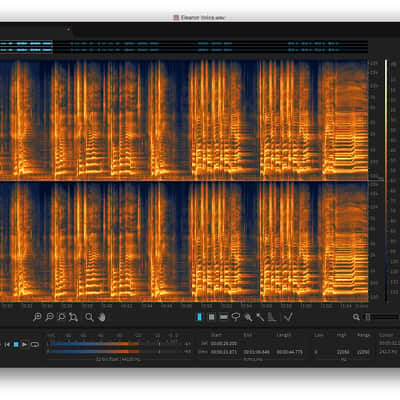
Visually identify audio problems with the spectrogram view then use familiar image editing tools to fix the issue.
Voice De-noise
Finely tuned for vocals and dialogue, reduce unwanted steady state or evolving background noise like air conditioning, refrigerator hum, and amp hiss.
De-clip
Repair digital and analog clipping artifacts to restore distorted audio.
De-click
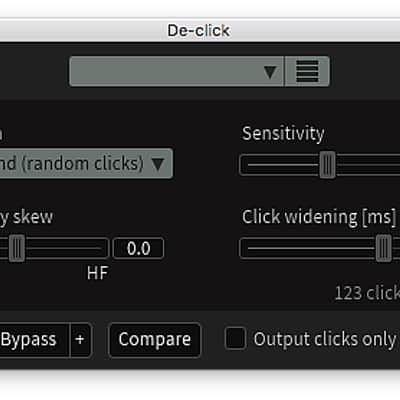
Clean up vinyl clicks, mouth noise, and soften up clicky bass guitars with the new low latency De-click algorithm.
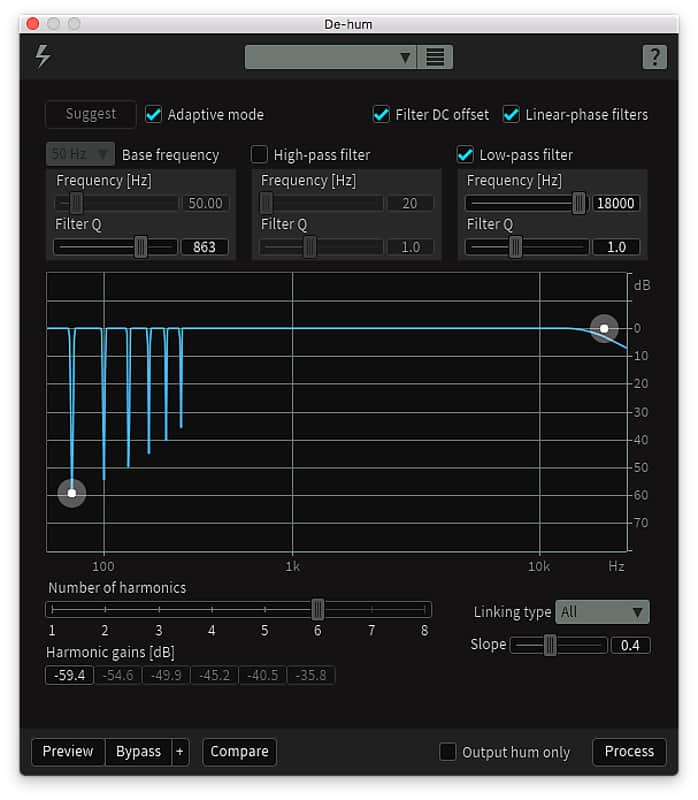
De-hum
Remove ground loop hum and line noise.
Compatibility
Installation Instructions
What it is:
The baby brother of iZotope’s RX 6 Standard.
How we use it:
For most all audio remedies.
Why it’s cool:
RX 6 Elements is wonderfully easy to use, but don’t let that diminish its capabilities.Introducing RX 6 Elements
RX is the industry standard audio repair tool that’s been used on countless albums, movies, and TV shows to restore damaged, noisy audio to pristine condition. RX Elements is a budget-friendly version of RX designed for small home studios that need the basics. It includes the standalone audio editor and spectral editing so you can visualize your audio and make edits with precision and accuracy.
In addition, RX Elements includes four essential, real-time noise reduction plug-ins that can also be used inside your favorite digital audio workstation, including the critically acclaimed De-noise technology.
Perfect for home musicians and podcasters on a budget
- Includes standalone audio editor with spectral editing
- Remove unwanted background noise with Voice De-noise plug-in
- Eliminate clicks and pops with De-click plug-in
- Remove buzz and grounding issues with De-hum plug-in
- Fix clipped audio takes with De-clip plug-in
RX Elements: Features
RX Audio Editor standalone application
Visually identify audio problems with the spectrogram view then use familiar image editing tools to fix the issue.
Voice De-noise
Finely tuned for vocals and dialogue, reduce unwanted steady state or evolving background noise like air conditioning, refrigerator hum, and amp hiss.
De-clip
Repair digital and analog clipping artifacts to restore distorted audio.
De-click
Clean up vinyl clicks, mouth noise, and soften up clicky bass guitars with the new low latency De-click algorithm.
De-hum
Remove ground loop hum and line noise.
Compatibility
NOTE: Within Pro Tools, we recommend using De-click and De-clip as AudioSuite plug-ins only.
Operating system requirements- Mac OS X 10.8–10.11
- Windows 7, 8, and 10
Native AAX 64 bit, RTAS 32 bit, Audiosuite DPM 32 bit and AAX 64 bit, AU 32 and 64 bit, VST 2 32 and 64 bit, VST 3
Plug-in host compatibilityPro Tools (10–12.4), Ableton Live (9.5), Logic Pro X (version 10.2), Nuendo 7 / Cubase 8.5, Audition CC 2015, Sonar, PreSonus Studio One, Media Composer 7.0.5 & 8.4.5, Premiere Pro CC 2015, Final Cut X, Sony Sound Forge (Windows: V.11.299; Mac: V.2.5.133), Digital Performer, Reaper
Installation Instructions
First Time Users: If you haven't already, create an account with iZotope: http://www.izotope.com/en/account/log-in/
- Download your installer (Mac or PC) from your account (this will be listed on the Legacy Products page: https://www.izotope.com/en/account/legacy-products/). Once the file has finished downloading to your computer, you will need to open and run the installer.
- Once you have gone through the install wizard and accepted the software license agreement, you will be prompted to select which features you would like to install. If you are not sure what you will need, it is advisable to just leave the default options ticked and press 'Continue'.
- Once you have selected your install features, press 'Continue' and start the 'Install'.
- Near the end of the installation, you will be prompted if you would like to 'check for updates to iZotope software', press yes on this prompt, and your plug-ins will be scanned to see if there are any newer versions for any of your iZotope products.
- If any updates are found, you will be prompted with an updates window where you can follow the on screen prompt.
- Once the installation is complete and all checks have been run, you will be prompted with an installation was successful window, which you can then 'Close'.
- When the installation is finished, you will next need to open and authorize the product. It is always best practice to authorize using the standalone version (if available).
- The first time launching for product, you will be prompted with an Authorization box. After clicking 'Authorize' you will need to enter your serial number and the Name and E-mail address used to create your iZotope user account. [If you intend to use your software offline, here you will need to press the 'Offline Authorization' button and follow the on screen instructions.]
- After pressing 'Authorize' you will see a pop-up box confirming your details for you to then press 'Submit'. Your software should now be fully authorized and ready to go!
- Download your installer (Mac or PC) from your account (this will be listed on the Legacy Products page: https://www.izotope.com/en/account/legacy-products/). Once the file has finished downloading to your computer, you will need to open and run the installer.