Syntonica Seismic
PriceFREE
Incl. VAT
Instant Download
This listing has ended
See similar gear from other Reverb sellers
Listed:over a month ago
Views:4,009
Saves:27
Downloads:603

Chicago, IL, United States
Our users rate Reverb
Wave-based synth for Mac.
What it is:
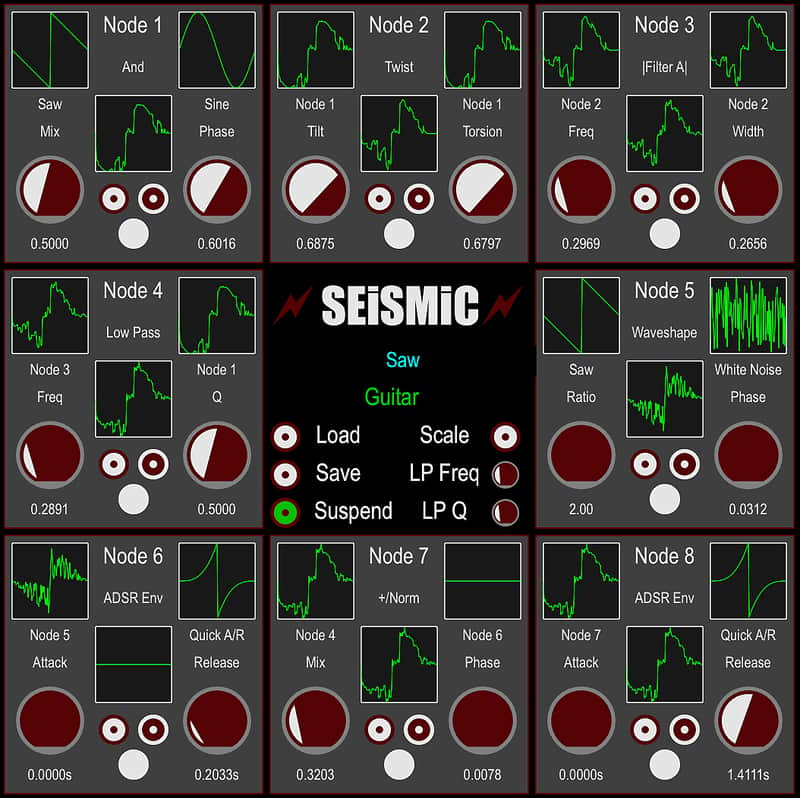
Versatile, fully-modular, wave-based synthesizer.
How we use it:
Construct custom pads, leads, and percussion.
Why it's cool:
Seismic's 8-node interface makes it a cinch to accomplish sounds unheard of on a more traditional synthesizer. A fully-modular, wave-based VST/AU for the Mac!
Compatibility
Currently, Seismic is Mac OS X-only. (A Windows version should appear once I learn how to Windows.) It should run on OS 10.6 or newer on any Mac with Intel inside. It is 32-bit and 64-bit, although the 32-bit GUI operation is not guaranteed. It should run with the Reaper, Tracktion 5 and newer, or any other 32-bit DAW that recognizes Reaper extensions. With other 32-bit DAWs, you may need to use the DAW GUI rather than the native GUI. Seismic has full names for its parameters, 5 per node plus 3 global, making 43 in all for the 3x3 version.
Installation Instructions
There is no automatic installer yet. To install, unzip Seismic by double-clicking on the zip file. Drag Seismic.vst off to one of these folders:
/Library/Audio/Plug-ins/VST or ~/Library/Audio/Plug-ins/VST
To install the AU version, unzip Seismic by double-clicking on the zip file. Rename it to Seismic.component. It should magically get the white Lego icon. Drag it off to: /Library/Audio/Plug-ins/Components or ~/Library/Audio/Plug-ins/Components
Follow your DAW's instructions on how to recognize new plug-ins.
Seismic is currently all self-contained, stuffed with the plug-in, this manual, presets and samples. To delete Seismic, just drag it off to the trash.
Once installed, open it up and click on the Seismic logo in the center to open the settings to access the PDF manual.
What it is:
Versatile, fully-modular, wave-based synthesizer.
How we use it:
Construct custom pads, leads, and percussion.
Why it's cool:
Seismic's 8-node interface makes it a cinch to accomplish sounds unheard of on a more traditional synthesizer. A fully-modular, wave-based VST/AU for the Mac!
Compatibility
Currently, Seismic is Mac OS X-only. (A Windows version should appear once I learn how to Windows.) It should run on OS 10.6 or newer on any Mac with Intel inside. It is 32-bit and 64-bit, although the 32-bit GUI operation is not guaranteed. It should run with the Reaper, Tracktion 5 and newer, or any other 32-bit DAW that recognizes Reaper extensions. With other 32-bit DAWs, you may need to use the DAW GUI rather than the native GUI. Seismic has full names for its parameters, 5 per node plus 3 global, making 43 in all for the 3x3 version.
Installation Instructions
There is no automatic installer yet. To install, unzip Seismic by double-clicking on the zip file. Drag Seismic.vst off to one of these folders:
/Library/Audio/Plug-ins/VST or ~/Library/Audio/Plug-ins/VST
To install the AU version, unzip Seismic by double-clicking on the zip file. Rename it to Seismic.component. It should magically get the white Lego icon. Drag it off to: /Library/Audio/Plug-ins/Components or ~/Library/Audio/Plug-ins/Components
Follow your DAW's instructions on how to recognize new plug-ins.
Seismic is currently all self-contained, stuffed with the plug-in, this manual, presets and samples. To delete Seismic, just drag it off to the trash.
Once installed, open it up and click on the Seismic logo in the center to open the settings to access the PDF manual.
| Brand | |
|---|---|
| Model |
|
| Categories |
Product safety information may be available here.