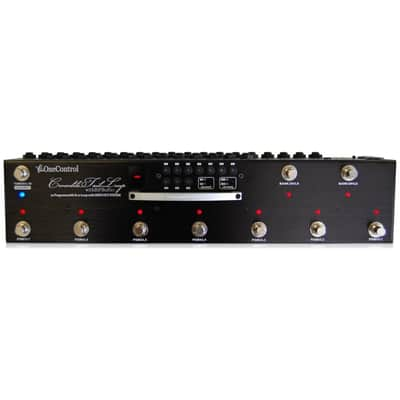
One Control OC10 Tail Loop Switcher ? Black Metal

One Control OC10 Tail Loop Switcher ? Black Metal
This gear has sold
See similar gear from other Reverb sellers

Our users rate Reverb
Selling my favorite switch!! Love this thing for live gigging. But moving onto a Line 6 Helix so must gather up the funds for that. Thanks for looking, mint condition. I am posting description right off of One Controls site to save you time in looking it up.
programs per bank and you can choose up to 10 programs for each program. The OC10 also is equipped midi and can send program changes or to be used as a midi through to be used in combination with other midi devices. Link two OC10 together with a simple LAN cable to access multiple pedals off stage. The OC10 also has the amazing from One Control included and also can be bypassed by using the not buffered input. The OC10 can also be a simple switcher but accessing the direct mode. Direct mode is perfect for band practices or experimenting with pedals before you’ve decided how to set your programs. The Crocodile Tail Loop truly is the most innovative pedal switchers on the market.
BJF Buffer Routing
Many people ask why the Crocodile Tail Loop has a buffered and nonbuffered input. The reason is because with some pedals, guitarists prefer to have a buffer later in their signal chain as to not interfere, or they simply would like no buffer at all.
That is why the Crocodile Tail Loop has a buffer input and output. Think of the buffer input and output just as you would any other guitar pedal. For example if You want have the buffer in loop 8 just run from send 8 into the buffer input, then from the buffer output into return 8.
The Crocodile Tail Loop gives an amazing amount of flexibility
when it comes to routing. Selectable buffer switching, amp channel switching and effect loop access are just some of the ways that the Crocodile Tail Loop can help you with routing you guitar and pedalboard.
Amp Channel Switching
The Crocodile Tail Loop has three separate loops that can be used for a variety of purposes. These loops can be used for amp channel switching or connecting effects to go into an amp’s effects loop as well as a variety of other functions to match individual guitar player’s needs.
Loops 8-10 are all labeled with NO and NC. This stands for normally open or normally closed. Check your amp's manual to see whether the foots switch in normally open or normally closed. If your amp has a quarter inch input for amp channel switching it is quite likely that the Crocodile Tail Loop will be able to switch your amp's channels.
Midi Functions
The Crocodile Tail Loop comes equipped with a midi input and output/thru. The Crocodile Tail Loop was built to be incredibly user friendly and we decided that should be a part of the midi function as well. With close to no programming at all, guitarists can switch midi programs with their favorite digital effects.
The Crocodile Tail Loop has TX and RX functions. TX stands for transmit midi, and RX stands for receive midi. Guitarists can choose whether or not they want to send or receive midi program changes on internal programs.
The midi output can also be changed to a midi thru. That way, if you'd like to use a more advanced midi controller or software to control your effects, it is completely possible.
Link and Sync Functions
One option that separates the Crocodile Tail Loop from many other switchers on the market is the Sync and Link functions. Being able to link or remotely control a loop switcher is incredibly important for many professional musicians. Whether or use a rack of effects or you prefer to have your tech controlling you patch changes, the Crocodile Tail Loop is a great solution for guitarists who use pedals.
The Link function allows players to connect two Crocodile Tail Loops together with a proprietary cable that uses LAN connectors. Please keep in mind; a standard LAN cable will not be able to connect two Crocodile Tail Loops together. The specific One Control cable must be used. A standard LAN cable will not work. Imagine being able to make combination of up to 20 pedals with one switch.
The Sync function is also extremely useful. As previously mentioned, being able to remotely control a loop switcher is extremely important for professional musicians. With the Crocodile Tail Loop, One Control gives you two options to do so. The first is using two Crocodile Tail Loop and controlling one with the other with our proprietary link cable. The second is using the Crocodile Tail Loop's midi input and controlling the Crocodile Tail Loop with your preferred MIDI controller. Since the Crocodile Tail Loop responds to standard program changes, using it with other midi controller's is very simple.
Using the Crocodile Tail Loop in Stereo
While the Crocodile Tail Loop's jacks are mono, it can be used with one stereo effect in combination with 8 mono pedals. Because the Crocodile Tail Loop has two identical outputs from loops 1-7 you
can use one of the extra outs to help with the stereo process. Please keep in mind that using a stereo pedal will take two of the separate loops from the Crocodile Tail Loop.
1.Run a cable from out #8 to stereo effect input
2.Run one left output from effect into return 8
3.Run the right output from effect into return 9
4.Run cable from out 1 into in 8
5.Run cable from out 2 into in 9
6.Run out 8 to left amp
7.Run out 9 to right amp
These processes can also we done with loops 9 and 10 if so desired. Please keep in mind that stereo effects should be the last step in setting up your Crocodile Tail Loop. Of course going mono after
going stereo would mean you final signal would once again become mono.
| Listed | 10 years ago |
|---|---|
| Condition | Mint (Used) Mint items are in essentially new original condition but have been opened or played.Learn more |
| Brand | |
| Model |
|
| Finish |
|
| Categories | |
| Year |
|
Product safety information may be available here.