Waves Tune
New Price€225.05
Instant Download
This gear has sold
See similar gear from other Reverb sellers
Listed:over a month ago
Views:504
Watchers:3
Offers:2

Chicago, IL, United States
Our users rate Reverb
The ultimate pitch correction tool from Waves.
What it is:
A powerful pitch correction plugin for natural-sounding, perfectly tuned vocals and creative effects.
How we use it:
Create perfectly tuned natural-sounding vocals.
Why it's cool:
Waves Tune operates in sync via ReWire so you won't have to use workarounds to achieve desired results. Auto-tuning has never been easier or more precise. The ultimate pitch correction tool, for perfectly tuned natural-sounding vocals or creative effects.
With an extensive palette of pitch shaping and transformation tools, including full ReWire support and formant correction, Waves Tune lets you do all your pitch editing right there within your DAW environment – no need to export sections or work offline. Better-sounding and more versatile than any other pitch correction processor, Waves Tune will get your vocals back on track.
Features:
Compatibility
Mac:
CPU
Memory
Operating System
Screen Resolution
Support for Visually Impaired Users
Windows:
CPU
Memory
Operating System
Screen Resolution
Installation Instructions
What it is:
A powerful pitch correction plugin for natural-sounding, perfectly tuned vocals and creative effects.
How we use it:
Create perfectly tuned natural-sounding vocals.
Why it's cool:
Waves Tune operates in sync via ReWire so you won't have to use workarounds to achieve desired results. Auto-tuning has never been easier or more precise. The ultimate pitch correction tool, for perfectly tuned natural-sounding vocals or creative effects.
With an extensive palette of pitch shaping and transformation tools, including full ReWire support and formant correction, Waves Tune lets you do all your pitch editing right there within your DAW environment – no need to export sections or work offline. Better-sounding and more versatile than any other pitch correction processor, Waves Tune will get your vocals back on track.
Features:
- Operates in sync and controls host transport using ReWire
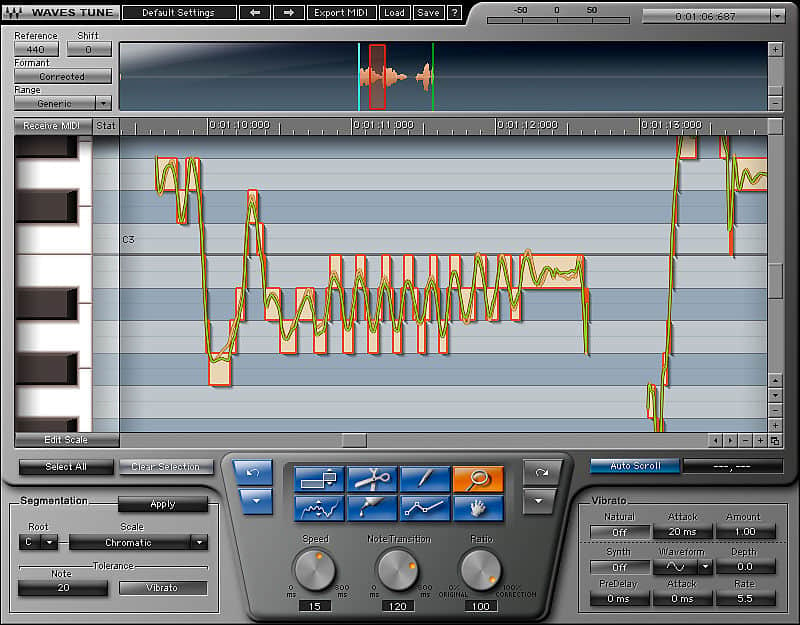
- Pitch edit graph with waveform overview, timeline, piano roll and pitch editor
- 3 timeline modes including bars/beats, minutes/seconds and samples
Compatibility
Mac:
CPU
- Intel Core i5 / i7 / Xeon
Memory
- 8 GB RAM
- 8 GB free disk space on the system drive
Operating System
- 10.10.5 - 10.12.6
Screen Resolution
- Minimum: 1024x768
- Recommended: 1280x1024 / 1600x1024
- USB displays are not supported as the primary display.
Support for Visually Impaired Users
- Mac OS Sierra 10.12.4
- VoiceOver Utility enabled
- Pro Tools 12.7
- Logic 10.3.1
Windows:
CPU
- Intel Core i3 / i5 / i7 / Xeon / AMD Quad-Core
Memory
- 4 GB RAM
- 8 GB free disk space on the system drive
Operating System
- Windows 7 with SP1 64 bit
- Windows 8.1 64 bit
- Windows 10 64 bit
Screen Resolution
- Minimum: 1024x768
- Recommended: 1280x1024 / 1600x1024
Installation Instructions
- Create an account: https://www.waves.com/create-account (if you have an account, skip this step)
- Register the serial number we emailed: https://www.waves.com/account/register
- Download and install Waves Central for Mac | Windows.
- If you already have Waves Central installed, skip to step 4. - Launch Waves Central.
- Windows: via the desktop shortcut or Start Menu > All Programs > Waves.
- Mac: Applications > Waves Central. - Log into Waves Central using your Waves account information.
- Click on Easy Install & Activate.
- Select the products you wish to install & activate on this computer.
- Click on the Install & Activate button.