
Soundtoys Devil-Loc Deluxe Audio Level Destroyer
This listing has ended
See similar gear from other Reverb sellers

Our users rate Reverb
What it is:
A crushing, pounding, aggressive compressor for massive drums and more.
How we use it:
Blend Devil-Loc in on the mix bus for game-changing grit.
Why it's cool:
Devil-Loc Deluxe pays homage to a piece of Shure hardware from the '60s whose magic that, had it not been for Soundtoys, most engineers would never experience.
SoundToys's Devil-Loc Deluxe spares nothing in its path of sonic destruction. When you want go go "further," but can't quite decide what that is, reach for Devil-Loc Deluxe. Crushing kick drums, massive sucking compression and insane rhythmic level-sweeps - this is dangerous sonic voodoo. The original Devil-Loc was cobbled together from the guts of a simple mic leveler when it came to light that pushing the device caused the signal to deteriorate in - shall we say - interesting ways. Use Devil-Loc Deluxe to conjure up your particular brand of sonic mayhem.
Features
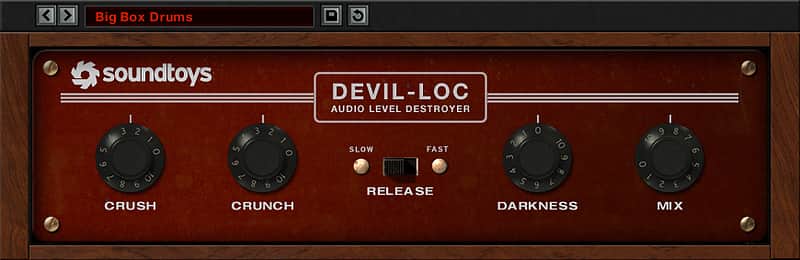
- "Darkness" control for tone
- Switchable slow or fast release times
- Mix the original back in right on the front panel
- Dark thundering drums
- Driven lo-fi loops - and more
Compatibility
Plug-in formats (both 32 and 64-bit):
- AAX Native, AAX AudioSuite, VST, and Audio Units (AU)
Supported sample rates:
- Minimum: 44.1 kHz, Maximum: 192 kHz
System requirements:
- Operating systems: Mac OS X 10.8 or later; Windows 7 or later
- An internet connection is required at the time of activation.
Supported host applications:
- Pro Tools (10.3.5 or later), Live, Cubase, Nuendo, Sonar, Logic, Digital Performer
- Click here to view our full list of compatible host applications.
Other requirements:
- iLok.com account (An iLok USB dongle is not required. Create a free account here)
Installation Instructions
Activation Instructions
- Download the Soundtoys installer from your Soundtoys account.
- If you already have an account go to: https://www.soundtoys.com/authorize/
- Run the installer on your computer.
- Open your host application (Pro Tools, Logic, etc.), which will scan your plug-ins and prompt you with an activation window.
- Type in your iLok account user ID and password and follow the steps to complete the activation.
- Make some music!
- You will need to have the iLok License Manager (ILM) application installed on your computer. This installs automatically with our Mac installers but is an option in the Windows installers.
- iLok USB keys are optional for all Soundtoys 5 products, but are not required.
- For information on version 4 activation, please click here.
- You can also use the iLok License Manager application to manage Soundtoys licenses.