MWaveShaper
PriceFREE
Incl. VAT
Instant Download
This listing has ended
See similar gear from other Reverb sellers
Listed:over a month ago
Views:2,575
Saves:35
Downloads:1,268

Chicago, IL, United States
Our users rate Reverb
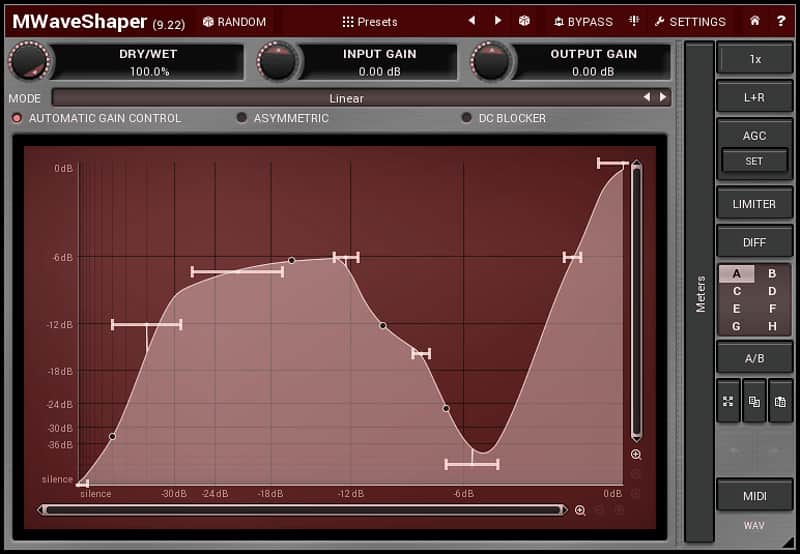
Construct your own signature sounds with this unconventional wave-shaper.
What it is
A distortion effect that increases instrument amplification by creating complex sound colors from simple tones.
How we use it
To emulate the gritty tone of fuzz stomp boxes using a computer interface.
Why it's cool
Clickable random shapes and automatic gain control create unexpected distortion at consistent volumes.From Melda Production:
The most advanced user interface on the market - stylable, resizable, GPU accelerated
Modern user interfaces must not only be easy and quick to use, but also versatile and the whole visual appearance should inspire you. This plugin features the most advanced GUI engine on the market. It is still the first and only GUI engine which is freely resizable and stylable. It also lets you choose between knobs, sliders or buttons, whichever you like the most. The plugin can look like ancient vintage gear, if you are working on old-school rock music, or like a super-modern futuristic device if you are working on modern electronic music. If your display doesn't have a high resolution, you can make the plugin smaller. If the fonts are too small, you can make the plugin bigger and save your eyes. All the graphics are accelerated using your GPU, providing ultimately quick response that keeps your CPU focused on the audio.
Unique visualization engine with classic meters and time graphs
Your ears should always be the main judge, but a smart metering system can often be a huge help. This plugin provides the most advanced metering system out there. The plugin can display the measurements of all relevant values using classic meters, or it can even show them in time using the time graphs. Everything is customizable as usual.
4 exceptionally versatile modulators
This plugin provides 4 fully-featured modulators which can control any set of parameters including other modulators. Each modulator works as an LFO, level follower, midi/audio triggered ADSR enveloper, randomizer or pitch detector, or even a combination and can listen to the plugin's side-chain. You can make the sound move in time, be less static and more interesting. You can make various parameters depend on the input (or the sidechain) level or even listen to the input pitch.
Adjustable oscillator shape technology
Every oscillator in This plugin uses the most versatile oscillator algorithm on the market. It provides a mix of predefined oscillator shapes, custom waveforms edited using our MeldaProduction Envelope System (MES), a step-sequencer and several methods for algorithmic post-processing. It also provides a harmonic mode, which lets you control the harmonic content instead of oscillator shape. This is especially useful for high frequency oscillators.
4 multiparameters
This plugin lets you control multiple parameters using a single so-called multiparameter. This may not only come handy for automation for example, but the multiparameters are very smart units and you can use them to smartly morph between banks of settings for example. All in the name of creativity!
M/S, single channel, up to 8 channels surround processing
This plugin can handle not only mono and stereo signals, but also mid/side encoding for stereo field processing, separate left & right channels, separate mid or side signal and up to 8 channels of surround audio. It is perfect for audio production for music, movies, and games.
Smart randomization
Being creative is sometimes complicated and one often needs an inspiration. By clicking a single button you can walk through the billions of possible settings and find the best one for you. The smart randomization algorithm wisely selects good sounding combinations of parameters. It can even randomize modulators for you. And if that's too much, you can just hold ctrl and This plugin will just slightly modify existing settings.
Automatic gain compensation (AGC)
Most plugins change loudness of the output audio, which makes browsing presets inconvenient, not mentioning randomization. This plugin includes automatic gain compensation, which quickly adapts to current settings and ensures the output sounds as loud as the input. This even protects you from thinking that something sounds better in cases it is just louder.
Safety limiter
Some plugins can intensely increase gain when exposed to specific audio materials. This plugin provides a safety brickwall limiter, which ensures the output stays below 0dB and prevents your equipment and your ears from potential danger automatically.
Sinc interpolation
This plugin implements the most advanced interpolation technology to provide the best audio quality.
Adjustable up-sampling 1x-16x
Digital audio provides very superior audio quality compared to ancient analog gear, but there are problems too. The main problem is the aliasing, which may be noticeable, when using nonlinear processes such as compression or saturation. This plugin includes both minimum-phase and high-quality linear-phase upsampling algorithms, which avoids the aliasing.
MIDI controllers with MIDI learn
This plugin contains a powerful MIDI processor, which listens to MIDI controllers and MIDI keyboard and controls any parameters realtime.
64-bit processing and an unlimited sampling rate
This plugin provides the maximum audio quality you can get. It uses 64-bit audio processing and can handle any sampling rate. It does not make much sense to go over 192kHz, but if you think it is a good idea, the plugin can do that.
Extremely fast, optimized for newest AVX capable processors
Computers are now extremely fast, but the algorithms are more complex and projects bigger, so we still need to use the processing power with care. This plugin uses the fastest algorithms, takes advantage of the newest processor capabilities, lets your GPU handle the graphics, and shares the resources with other MeldaProduction plugins. The plugin is among the fastest on the market, yet it provides the best possible audio quality.
Global preset management and online preset exchange
Plugin presets are carefully stored in a system database and you can quickly access then from any project in any host. The plugin can automatically share your presets and download presets of other users from our servers. We are building a community and you can be a part of it!
Supports VST, VST3, AU and AAX interfaces on Windows & Mac, both 32-bit and 64-bit
Melda plugins support all major hosts on both platforms. Check system requirements for information about compatibility and installation.
No dongle nor internet access is required for activation
How many times did you forget your USB dongle? We are an honest company and expect the same from our customers. Our software uses license files to activate your software. And the licenses are to-person, so you can use it on all your computers as long as you are the user.
Free-for-life updates
When you buy the software you are entitled to free updates, forever. No more money wasted on major upgrades like it is with other companies. And we upgrade our software a lot!
Compatibility
Windows
macOS
Linux is not directly supported, but it is apparently possible to run the plugins via Wine. Before installing you have to make sure that your ".wine/drive_c/windows/Fonts/" directory is populated with Microsoft True Type Fonts (which is generally available as a package on Linux distributions).
Installation Instructions
General Instructions:
How to install plugins in Ableton Live:
What it is
A distortion effect that increases instrument amplification by creating complex sound colors from simple tones.
How we use it
To emulate the gritty tone of fuzz stomp boxes using a computer interface.
Why it's cool
Clickable random shapes and automatic gain control create unexpected distortion at consistent volumes.From Melda Production:
The most advanced user interface on the market - stylable, resizable, GPU accelerated
Modern user interfaces must not only be easy and quick to use, but also versatile and the whole visual appearance should inspire you. This plugin features the most advanced GUI engine on the market. It is still the first and only GUI engine which is freely resizable and stylable. It also lets you choose between knobs, sliders or buttons, whichever you like the most. The plugin can look like ancient vintage gear, if you are working on old-school rock music, or like a super-modern futuristic device if you are working on modern electronic music. If your display doesn't have a high resolution, you can make the plugin smaller. If the fonts are too small, you can make the plugin bigger and save your eyes. All the graphics are accelerated using your GPU, providing ultimately quick response that keeps your CPU focused on the audio.
Unique visualization engine with classic meters and time graphs
Your ears should always be the main judge, but a smart metering system can often be a huge help. This plugin provides the most advanced metering system out there. The plugin can display the measurements of all relevant values using classic meters, or it can even show them in time using the time graphs. Everything is customizable as usual.
4 exceptionally versatile modulators
This plugin provides 4 fully-featured modulators which can control any set of parameters including other modulators. Each modulator works as an LFO, level follower, midi/audio triggered ADSR enveloper, randomizer or pitch detector, or even a combination and can listen to the plugin's side-chain. You can make the sound move in time, be less static and more interesting. You can make various parameters depend on the input (or the sidechain) level or even listen to the input pitch.
Adjustable oscillator shape technology
Every oscillator in This plugin uses the most versatile oscillator algorithm on the market. It provides a mix of predefined oscillator shapes, custom waveforms edited using our MeldaProduction Envelope System (MES), a step-sequencer and several methods for algorithmic post-processing. It also provides a harmonic mode, which lets you control the harmonic content instead of oscillator shape. This is especially useful for high frequency oscillators.
4 multiparameters
This plugin lets you control multiple parameters using a single so-called multiparameter. This may not only come handy for automation for example, but the multiparameters are very smart units and you can use them to smartly morph between banks of settings for example. All in the name of creativity!
M/S, single channel, up to 8 channels surround processing
This plugin can handle not only mono and stereo signals, but also mid/side encoding for stereo field processing, separate left & right channels, separate mid or side signal and up to 8 channels of surround audio. It is perfect for audio production for music, movies, and games.
Smart randomization
Being creative is sometimes complicated and one often needs an inspiration. By clicking a single button you can walk through the billions of possible settings and find the best one for you. The smart randomization algorithm wisely selects good sounding combinations of parameters. It can even randomize modulators for you. And if that's too much, you can just hold ctrl and This plugin will just slightly modify existing settings.
Automatic gain compensation (AGC)
Most plugins change loudness of the output audio, which makes browsing presets inconvenient, not mentioning randomization. This plugin includes automatic gain compensation, which quickly adapts to current settings and ensures the output sounds as loud as the input. This even protects you from thinking that something sounds better in cases it is just louder.
Safety limiter
Some plugins can intensely increase gain when exposed to specific audio materials. This plugin provides a safety brickwall limiter, which ensures the output stays below 0dB and prevents your equipment and your ears from potential danger automatically.
Sinc interpolation
This plugin implements the most advanced interpolation technology to provide the best audio quality.
Adjustable up-sampling 1x-16x
Digital audio provides very superior audio quality compared to ancient analog gear, but there are problems too. The main problem is the aliasing, which may be noticeable, when using nonlinear processes such as compression or saturation. This plugin includes both minimum-phase and high-quality linear-phase upsampling algorithms, which avoids the aliasing.
MIDI controllers with MIDI learn
This plugin contains a powerful MIDI processor, which listens to MIDI controllers and MIDI keyboard and controls any parameters realtime.
64-bit processing and an unlimited sampling rate
This plugin provides the maximum audio quality you can get. It uses 64-bit audio processing and can handle any sampling rate. It does not make much sense to go over 192kHz, but if you think it is a good idea, the plugin can do that.
Extremely fast, optimized for newest AVX capable processors
Computers are now extremely fast, but the algorithms are more complex and projects bigger, so we still need to use the processing power with care. This plugin uses the fastest algorithms, takes advantage of the newest processor capabilities, lets your GPU handle the graphics, and shares the resources with other MeldaProduction plugins. The plugin is among the fastest on the market, yet it provides the best possible audio quality.
Global preset management and online preset exchange
Plugin presets are carefully stored in a system database and you can quickly access then from any project in any host. The plugin can automatically share your presets and download presets of other users from our servers. We are building a community and you can be a part of it!
Supports VST, VST3, AU and AAX interfaces on Windows & Mac, both 32-bit and 64-bit
Melda plugins support all major hosts on both platforms. Check system requirements for information about compatibility and installation.
No dongle nor internet access is required for activation
How many times did you forget your USB dongle? We are an honest company and expect the same from our customers. Our software uses license files to activate your software. And the licenses are to-person, so you can use it on all your computers as long as you are the user.
Free-for-life updates
When you buy the software you are entitled to free updates, forever. No more money wasted on major upgrades like it is with other companies. And we upgrade our software a lot!
Compatibility
Windows
- Windows XP / Vista / 7 / 8 / 10 (32-bit or 64-bit)
- VST / VST3 / AAX compatible host (32-bit or 64-bit)
- Intel/AMD processor with SSE2 support
macOS
- macOS (10.6 and newer, 32-bit or 64-bit)
- VST / VST3 / AU / AAX compatible host (32-bit or 64-bit)
- Intel/AMD processor with SSE2 support
- AU note: in some hosts, the GUI is not shown for the first time, if so, then please just restart the host.
Linux is not directly supported, but it is apparently possible to run the plugins via Wine. Before installing you have to make sure that your ".wine/drive_c/windows/Fonts/" directory is populated with Microsoft True Type Fonts (which is generally available as a package on Linux distributions).
Installation Instructions
General Instructions:
- We auto-detect your computer operating system, so just click the download button above
- Find the downloaded plugin (it’s in your computer’s download folder) and double click it
- A plugin installer window will open, so go through the installation process
- We will also send you an email with a link to re-download in case you need it
How to install plugins in Ableton Live:
- If Ableton is closed, open it and skip to #5
- If Ableton is already open, go to Preferences
- Go to Files & Folder
- Click “Rescan plugins”
- Find the plugin in the Ableton plugins folder in the sidebar
- Drag-and-drop the plugin onto your track at the bottom of the screen
- Open Logic Pro X
- Create a software instrument track if you downloaded a virtual instrument plugin
- Under Default Patch, go to AU Instruments and choose the plugin you just installed
- If you downloaded an effect or utility plugin, you can insert them on the mixer
| Brand | |
|---|---|
| Model |
|
| Categories |
Product safety information may be available here.