Waves Renaissance Bass
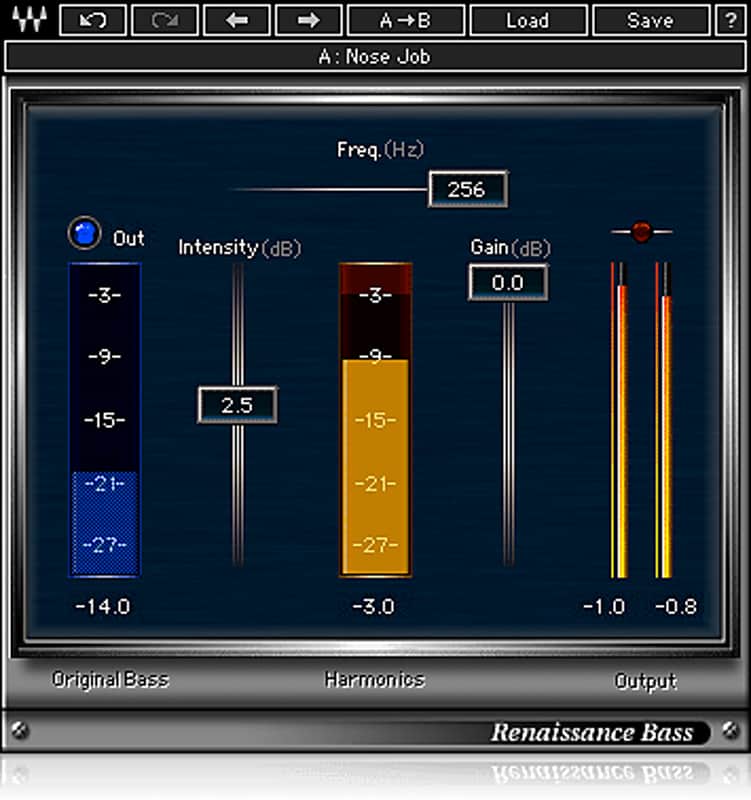
Waves Renaissance Bass
Precio nuevo €66.69
Incl. IVA
Descarga instantánea
Este equipo se ha vendido
Ver equipos similares de otros vendedores de Reverb
Publicado:hace más de un mes
Visitas:1.519
Guardados:8
Ofertas:11

Chicago, IL, Estados Unidos
Nuestros usuarios valoran Reverb
Enhance your low end with this patented technology.
What it is:
A low frequency exciter to tighten up your bass in the mix.
How we use it:
Add Renaissance Bass as an insert to any low end element like bass or percussion tracks.
Why it's cool:
Renaissance Bass is a quick and easy fix for low-end definition. Renaissance Bass delivers richer, deeper lows that sound great on any system. Using Waves patented MaxxBass® psycho-acoustic technology, Renaissance Bass makes tightening up the low end easier than ever, thanks to its simple, intuitive controls.
Compatibility
Mac OS:
CPU
Memory
Operating System
Screen Resolution
Supported Hosts - Mac:
Windows OS:
CPU
Memory
Operating System
Screen Resolution
Supported Hosts - Windows:
Installation Instructions
What it is:
A low frequency exciter to tighten up your bass in the mix.
How we use it:
Add Renaissance Bass as an insert to any low end element like bass or percussion tracks.
Why it's cool:
Renaissance Bass is a quick and easy fix for low-end definition. Renaissance Bass delivers richer, deeper lows that sound great on any system. Using Waves patented MaxxBass® psycho-acoustic technology, Renaissance Bass makes tightening up the low end easier than ever, thanks to its simple, intuitive controls.
- Bigger, tighter bass from any system
- Extends perceived bass response by up to 1.5 octaves
- Clip-free performance
Compatibility
Mac OS:
CPU
- Intel Core i3 / i5 / i7 / Xeon
Memory
- 4 GB RAM
- 4 GB free disk space
Operating System
- 10.9.5 - 10.12.1
- 10.8.5 for ProTools 10 only
Screen Resolution
- Minimum: 1024x768
- Recommended: 1280x1024 / 1600x1024
- USB displays are not supported as the primary display.
Supported Hosts - Mac:
- Pro Tools 11.3.2 - 12.6 (AAX Native 64-bit, Audiosuite)
- Pro Tools 10.3.10 (RTAS, Audiosuite)
- Logic Pro X 10.2 - 10.2.4 (Audio Units)
- Digital Performer 9.0 - 9.1.2 (Audio Units)
- Ableton Live 9.2.2 - 9.7 (VST)
- Nuendo 7.0.20 - 7.1 (VST3)
- Cubase 8.0.30 - 8.5 (VST3)
- WaveLab 9.0.10 - 9.0.15 (VST3)
- Main Stage 3.2 - 3.2.3 (Audio Units)
- Garage Band 10.1.0 - 10.1.3 (Audio Units)
- Audition CC2015, CC2017 (VST3)
- Adobe Premiere CC2015, CC2017 (VST3)
- Final Cut Pro X 10.2.2 - 10.2.3 (Audio Units)
- Studio One 3.1 - 3.3.1 (VST3)
- Media Composer 8.6.3 - 8.6.4 (AAX Native)
- Sound Forge Pro 2.5 (Audio Units)
- REAPER 5.18 - 5.22 (VST3)
Windows OS:
CPU
- Intel Core i3 / i5 / i7 / Xeon / AMD Quad-Core
Memory
- 4 GB RAM
- 4 GB free disk space
Operating System
- Windows 7 with SP1 64 bit
- Windows 8.1 64 bit
- Windows 10 64 bit
Screen Resolution
- Minimum: 1024x768
- Recommended: 1280x1024 / 1600x1024
Supported Hosts - Windows:
- Pro Tools 11.3.2 - 12.6 (AAX Native 64-bit, Audiosuite)
- Pro Tools 10.3.8 - 10.3.10 (RTAS, Audiosuite)
- Ableton Live 9.1.6 - 9.7 (VST)
- Nuendo 6.5.35 - 7.1 (VST3)
- Cubase 7.5.30 - 8.5 (VST3)
- WaveLab 8.5, 9.0.10 - 9.0.15 (VST3)
- Sonar X3e (VST3), Platinum (VST3)
- Sound Forge 10.0e, 11 (VST)
- Vegas Pro 12 - 14 (VST)
- Acid 7.0e (VST)
- Audition CC2014, CC2015, CC2017 (VST3)
- Adobe Premiere CC2014, CC2015, CC2017 (VST3)
- Samplitude Pro X (VST), Pro X2 (VST), Pro X3 (VST)
- Sequoia 12 - 13 (VST)
- Pyramix 9.0.7 - 9.1.6 (VST)
- Studio One 3.1 - 3.3.1 (VST3)
- Media Composer 7.0.4 (RTAS), 8.6.3 - 8.6.4 (AAX Native)
- FL Studio 12.1.3 - 12.4 (VST3)
- REAPER 5.18 - 5.22 (VST3)
Installation Instructions
- Create an account: https://www.waves.com/create-account (if you have an account, skip this step)
- Register the serial number we emailed: https://www.waves.com/account/register
- Download and install Waves Central for Mac | Windows.
- If you already have Waves Central installed, skip to step 4. - Launch Waves Central.
- Windows: via the desktop shortcut or Start Menu > All Programs > Waves.
- Mac: Applications > Waves Central. - Log into Waves Central using your Waves account information.
- Click on Easy Install & Activate.
- Select the products you wish to install & activate on this computer.
- Click on the Install & Activate button.