
Waves SSL E-Channel Plug-in
Nouveau prix€232.18
Téléchargement instantané
Ce matériel a été vendu
Découvrez du matériel similaire proposé par d'autres vendeurs Reverb
Mis en ligne:il y a plus d'un mois
Vues:4 109
Ajouts aux favoris:22
Offres:24

Chicago, IL, États-Unis
Nos utilisateurs évaluent Reverb
A slice of the world's greatest hit-making machine.
What it is:
An emulation of the SSL 4000's Black Knob equalizer circuit.
How we use it:
Bring out the oopmh in your hard-hitting drums.
Why it's cool:
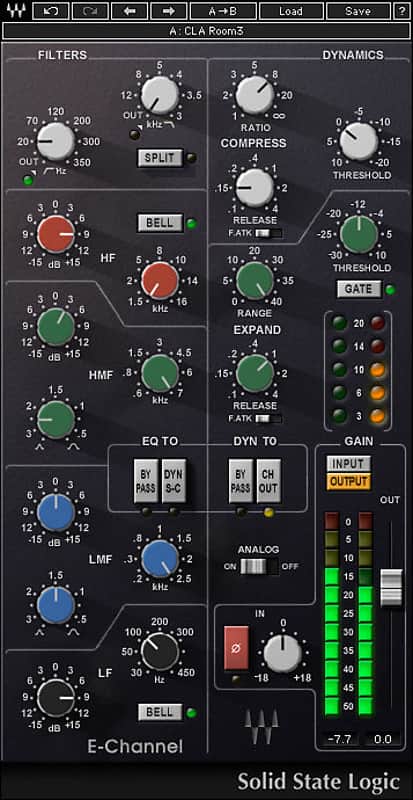
Waves, licensed by SSL, brings the the legendary EQ and dynamics from an iconic board, right to your computer. The SSL E-Channel delivers the incomparable sound of the Solid State Logic 4000-series console’s all-discrete design and its Class A, VCA chip. It’s a slice of the world’s greatest hitmaking machine, in your computer.
The equalization section of the SSL E-Channel is based on the renowned Black Knob equalizer, developed in 1983 with legendary producer George Martin. It features a High Pass Filter, Low Pass Filter, and a four-band parametric equalizer.
The dynamics section features a soft-knee compressor/limiter and an expander/gate modeled on the SSL LS611E. Like the original, it can be placed before or after the equalization section, and makeup gain is automatically applied to maintain a steady output level.
Features:
Compatibility
Mac:
CPU
Memory
Operating System
Screen Resolution
Support for Visually Impaired Users
CPU
Memory
Operating System
Screen Resolution
Installation Instructions
What it is:
An emulation of the SSL 4000's Black Knob equalizer circuit.
How we use it:
Bring out the oopmh in your hard-hitting drums.
Why it's cool:
Waves, licensed by SSL, brings the the legendary EQ and dynamics from an iconic board, right to your computer. The SSL E-Channel delivers the incomparable sound of the Solid State Logic 4000-series console’s all-discrete design and its Class A, VCA chip. It’s a slice of the world’s greatest hitmaking machine, in your computer.
The equalization section of the SSL E-Channel is based on the renowned Black Knob equalizer, developed in 1983 with legendary producer George Martin. It features a High Pass Filter, Low Pass Filter, and a four-band parametric equalizer.
The dynamics section features a soft-knee compressor/limiter and an expander/gate modeled on the SSL LS611E. Like the original, it can be placed before or after the equalization section, and makeup gain is automatically applied to maintain a steady output level.
Features:
- Unsurpassed for hard-hitting drum sounds
- Includes presets from GRAMMY®-winning mixer Chris Lord-Alge
- Developed under license from Solid State Logic
Compatibility
Mac:
CPU
- Intel Core i5 / i7 / Xeon
Memory
- 8 GB RAM
- 8 GB free disk space on the system drive
Operating System
- 10.10.5 - 10.13.1
Screen Resolution
- Minimum: 1280x1024 / 1600x1024
- Recommended: 1920x1080
- USB displays are not supported as the primary display.
Support for Visually Impaired Users
- Mac OS Sierra 10.12.4
- VoiceOver Utility enabled
- Pro Tools 12.7
- Logic 10.3.1
CPU
- Intel Core i3 / i5 / i7 / Xeon / AMD Quad-Core
Memory
- 4 GB RAM
- 8 GB free disk space on the system drive
Operating System
- Windows 7 with SP1 64 bit
- Windows 8.1 64 bit
- Windows 10 64 bit
Screen Resolution
- Minimum: 1280x1024 / 1600x1024
- Recommended: 1920x1080
Installation Instructions
- Create an account: https://www.waves.com/create-account (if you have an account, skip this step)
- Register the serial number we emailed: https://www.waves.com/account/register
- Download and install Waves Central for Mac | Windows.
- If you already have Waves Central installed, skip to step 4. - Launch Waves Central.
- Windows: via the desktop shortcut or Start Menu > All Programs > Waves.
- Mac: Applications > Waves Central. - Log into Waves Central using your Waves account information.
- Click on Easy Install & Activate.
- Select the products you wish to install & activate on this computer.
- Click on the Install & Activate button.