Tunefish Synthesizer
PriceFREE
Incl. VAT
Instant Download
This listing has ended
See similar gear from other Reverb sellers
Listed:over a month ago
Views:5,703
Saves:44
Downloads:2,808

Chicago, IL, United States
Our users rate Reverb
From flanged snares to wavy pads - Tunefish is your new favorite multi-purpose synth.
What it is:
A versatile synthesizer packed with stackable effects from EQ to flange.
How we use it:
From wavy pads to echoing snare rolls, Tunefish Synth fills all the gaps in a track.
Why it's cool:
Tunefish's delay algorithm paired with its drum presets add unique energy and character to your tracks. Tunefish v4 was developed as a smaller replacement of Tunefish v3 with roughly the same power - forcing us to focus on how to most effectively produce music in very tight machine code. The result was totally worth it and some might argue it is even more powerful. To open it up to a broader range of people, it was also ported over to Linux and MacOS and it was given a new polished UI.
Compatibility
Minimum Requirements:
Installation Instructions
On a Mac:
What's new?
What it is:
A versatile synthesizer packed with stackable effects from EQ to flange.
How we use it:
From wavy pads to echoing snare rolls, Tunefish Synth fills all the gaps in a track.
Why it's cool:
Tunefish's delay algorithm paired with its drum presets add unique energy and character to your tracks. Tunefish v4 was developed as a smaller replacement of Tunefish v3 with roughly the same power - forcing us to focus on how to most effectively produce music in very tight machine code. The result was totally worth it and some might argue it is even more powerful. To open it up to a broader range of people, it was also ported over to Linux and MacOS and it was given a new polished UI.
Features:
- Tunefish 4.1.0 is now open source. Source code can be accessed via GitHub.
- Available on Windows and Linux as VST (32 and 64 bit) and on Mac as Audio Unit or VST (Universal binary).
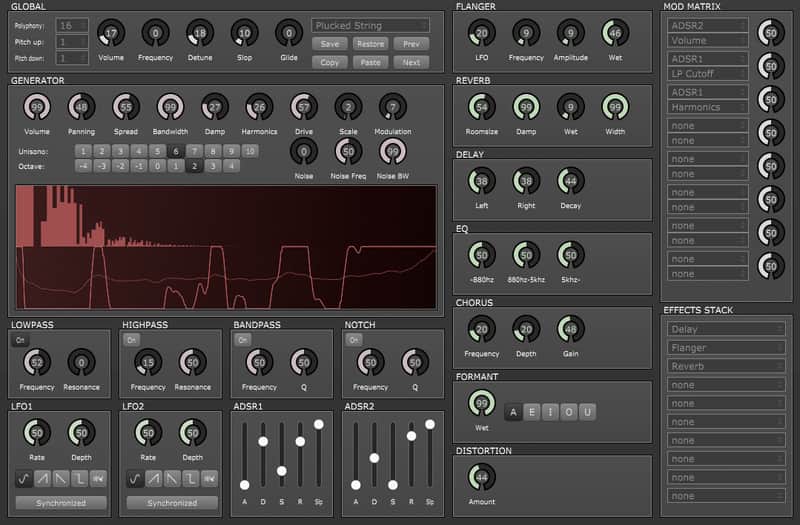
- Improved UI compared to TF3 which will visualize all modulations.
- Uses an additive synthesis based wavetable generator.
- The Noise generator can produce any frequency of noise with any bandwidth.
- Lowpass, Highpass, Bandpass and an improved Notch filter are available.
- 2 ADSRs and 2 LFOs that can be linked to pretty much any important knob using a modulation matrix.
- Supported effects are Flanger, Chorus, Distortion, Delay, Reverb, EQ and Formant.
- The effects stack allows for any permutation of up to 10 effects.
Compatibility
Minimum Requirements:
- Mac OS X 10.6 with Intel CPU
- Windows XP or newer 32/64bit
- Ubuntu 13.10 32/64bit (Should work fine on other distributions but was built on this config)
Installation Instructions
On a Mac:
- Double click the file to unzip it.
- Go to Macintosh HD/Library/Audio/Plug-Ins and either
- drop the tunefish4.vst file into your VST folder.
- drop the tunefish4.component file into your Components folder.
- drop the tunefish4.vst file into your VST folder.
- Double click the file to unzip it.
- Open the win32 folder and drag the .dll file into C:\Program Files\Steinberg\Vstplugins\
What's new?
- Version 4.1.0: Tunefish goes open source.
- Access the source code via GitHub.
| Brand | |
|---|---|
| Model |
|
| Categories |
Product safety information may be available here.