Cakewalk Z3TA+ 2 Waveshaping Synth
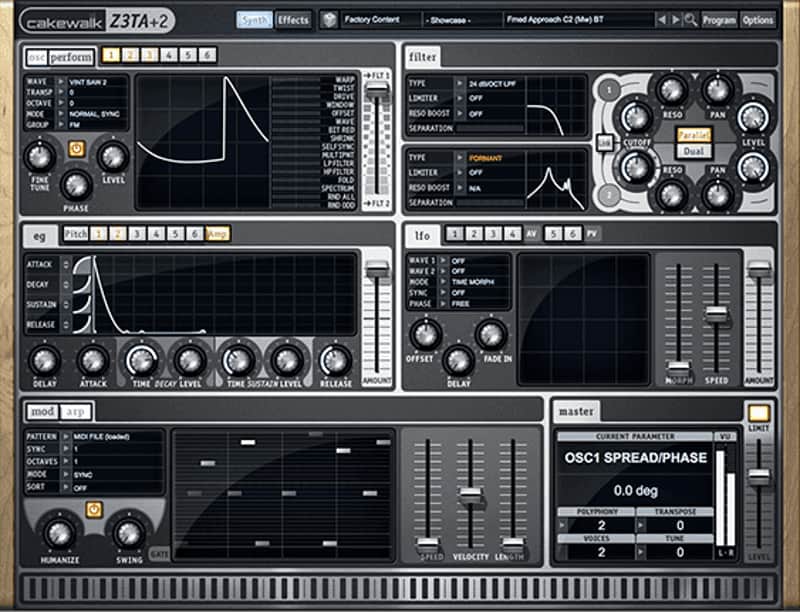

Cakewalk Z3TA+ 2 Waveshaping Synth
New Price€39.49
Incl. VAT
Instant Download
This gear has sold
See similar gear from other Reverb sellers
Listed:over a month ago
Views:1,571
Saves:34

Chicago, IL, United States
Our users rate Reverb
Sculpt and shape your ideal synthesis from warm pop pads to staccato trap snares.
What it is:
An incredibly versatile synthesis engine featuring an array of studio quality effects.
How we use it:
Fine-tune the waveform to fit any production style and fill the holes in a mix.
Why it's cool:
Whether you're shooting for the beloved synth sounds of the past or looking to construct your own signature synthesis, Z3TA+ 2 allows you such versatility without the typical inhibitors and complications found in many software synths. Waveshaping Synthesis for Mac and PC
Z3TA+ 2 - The Ultimate Waveshaping Synth
Waveshaping Synthesis
Built-in Effects
Compatibility
Windows
Mac OS X
Installation Instructions
We recommend taking the following steps after getting your serial number from Reverb SYNC:
General Instructions:
What it is:
An incredibly versatile synthesis engine featuring an array of studio quality effects.
How we use it:
Fine-tune the waveform to fit any production style and fill the holes in a mix.
Why it's cool:
Whether you're shooting for the beloved synth sounds of the past or looking to construct your own signature synthesis, Z3TA+ 2 allows you such versatility without the typical inhibitors and complications found in many software synths. Waveshaping Synthesis for Mac and PC
- Ultimate waveshaping control with dozens of sonic tools
- Intuitive and graphically responsive interface
- 2,000+ professionally crafted presets
- Built-in fully customizable studio quality FX.
Z3TA+ 2 - The Ultimate Waveshaping Synth
Z3TA+2 is designed to suit any and all of your electronic productions. From pop to trap, energetic to atmospheric, you’ll have the sounds you need at your fingertips.
Waveshaping Synthesis
- Choose, tweak, and fine-tune your waveform
- Free and adaptive pitch-bending analog style performance grid
- 14 continuously variable dual-stage filter types
- Envelopes to control any parameter
- 6 Powerful LFOs for individual or universal control
- Straightforward Mod Matrix and Arpeggio tools
- Global control for a crushing brickwall limiter, level, tuning, and polyphony
Built-in Effects
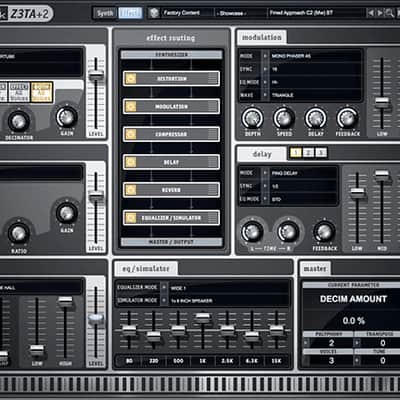
- 5 distortion types, plus routing options and continuously variable controls
- Slow, Medium, and Fast compression with threshold, ratio, and makeup gain controls
- Totally tweakable Room, Hall, and Plate reverbs
- 7-band graphic eq with variable band settings and colorful Simulator Mode
- 9 adjustable Chorus, Phaser, and Flanger effects
- 4 Stereo Delay types with Sync and EQ controls
- Drag-and-drop effects in any order
Compatibility
Windows
- Windows 7, Windows 8 / 8.1, Windows 10
- Processor: Intel Core 2 Duo or newer
- Memory: Minimum 2 GB RAM
- Disk space: Approximately 60MB
- Formats: AAX, VST2i, VST3i, Standalone Version (32 or 64Bit)
Mac OS X
- Minimum: OS X 10.8, Recommended: OS X 10.10 - 10.11
- Processor: Intel Core 2 Duo or newer
- Memory: Minimum 2 GB RAM
- Disk space: Approximately 60MB
- Formats: AAX, Audio Unit, VST3i (32 or 64Bit)
Installation Instructions
We recommend taking the following steps after getting your serial number from Reverb SYNC:
- Create/Login to a Cakewalk Account at https://www.cakewalk.com/My-Account
- Visit http://www.cakewalk.com/redeem
- Enter the redemption key emailed to you by Reverb SYNC.
- Click the Redeem button and then start downloading your product! Your downloads and serial numbers will now be displayed at https://www.cakewalk.com/My-Account/Products
General Instructions:
- We auto-detect your computer operating system, so just click the download button above.
- Find the downloaded plugin (it's in your computer's download folder, or wherever you've chosen to save it) and double click the installer.
- A plugin installer window will open. Simply go through the installation process.
- We will also send you an email with a link to re-download in case you need it.
- If Ableton Live is closed, open it and skip to #5.
- If Ableton Live is already open, go to Preferences.
- Go to Files & Folder.
- Click "Rescan plugins".
- Find the plugin in the Ableton plugins folder in the sidebar.
- Drag-and-drop the plugin onto your track at the bottom of the screen.
- Open Logic Pro X. Newly installed plugins should be detected automatically every time Logic is opened.
- If you've downloaded an effect or utility plugin, these can be used on an insert for any track in the mixer.
- Create a software instrument track if you downloaded a virtual instrument plugin.
- Under Default Patch, go to AU Instruments and choose the plugin you just installed.
- Open Pro Tools. Newly installed plugins should be detected automatically every time Pro Tools is opened.
- If you've downloaded an effect or utility plugin, these can be used on an insert for many types of tracks (Audio, Aux, Instrument, Master Fader...)
- If you’ve downloaded a software instrument, create a new Instrument track.
- Navigate to the Mixer and locate the newly created Instrument track.
- Select the desired instrument plugin by clicking on any of the Inserts on the Instrument track.
- Go to the Reverb SYNC Software and plugin Collection.
- Choose your desired plugin.
- Reverb will auto-detect your platform, so simply click the download button.
- Continue the installation process by following the prompt.
- Hover your mouse over the smart control button.
- Click Show Inspector icon.
- Click on plugins and choose your desired plugin.
| Brand | |
|---|---|
| Model |
|
| Categories |
Product safety information may be available here.