Eventide Instant Flanger Mk II
This listing has ended
See similar gear from other Reverb sellers

Our users rate Reverb
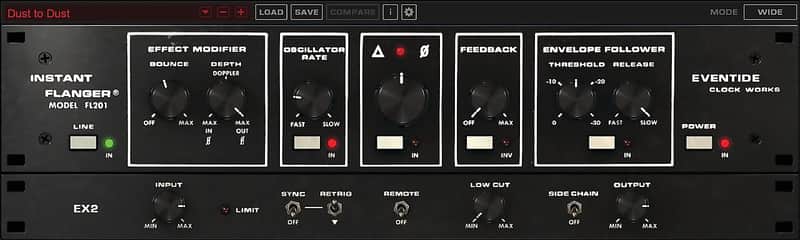
Today, Eventide’s updated Instant Flanger Mk II plug-in is a more authentic recreation of the original Eventide Clockworks Instant Flanger in both appearance and — all-important — sound. Creative mixing and sound design for modern music production, video game, and motion picture scores can easily be achieved by any musician or engineer using Instant Flanger Mk II. As an easy-to-use, expressive plug- in that offers new creative controls and features while retaining the magical sound and functionality of the original hardware, Instant Flanger Mk II delivers stunning results for any mix or desirable flanging track effect.
Creative controls and features:
• Three distinct flanging flavors — set MODE for SHALLOW, DEEP, or WIDE.
• MANUAL control allows adjustment of the ‘comb’ effect by turning the big knob.
• OSCILLATOR drives the flanging at a user-determined rate.
• ENVELOPE FOLLOWER drives the flanging based on the source signal’s amplitude.
• REMOTE maps the flanging control to a keyboard controller’s mod wheel for tactile manipulation.
• DEPTH allows users to set the intensity of the effect — 100% adds the dry signal to the delayed signal, -100% adds the phase-
inverted dry signal to the delayed signal.
• BOUNCE creates the distinctive effect of the tape machine’s capstan motor ‘hunting’ for its proper speed when the engineer
removed their thumb from the tape reel flange.
• SIDE CHAIN allows for triggering the ENVELOPE FOLLOWER from a separate source in the mix for inter-track mingling.
• Exercise total control of the OSCILLATOR with SYNC and RETRIG controls.
• Tame the intensity by removing low frequencies from the flanged signal with the LOW CUT knob.
“Decades later, reflecting on the heart and soul of the many songs that were enhanced by the original machine’s sound, creating a plug-in that’s convenient and affordable for modern music makers is something that we’re quite proud of,” concludes Tony Agnello, adding: “An incredible legacy of hits were made with our original hardware in studios the world over, and we anticipate that many more will be made in the future with the Instant Flanger Mk II plug-in.”
Compatibility
Instant Flanger Mk II is available as an AAX/AU/VST plug-in for Mac and PC.
For more in-depth information, including a free and fully-functional 30-day trial, please visit the
dedicated Instant Flanger Mk II webpage here: https://www.eventideaudio.com/instantflanger
Installation Instructions
Registration, Activation, and Installation
Eventide uses PACE’s ilok.com licensing system, with or without an iLok hardware dongle, to license our plug-in products. Each license provides two activations which can reside on either your computer or on an iLok license dongle. Once you’ve purchased your plug-in, you’ll need to register it on Eventide’s website, activate your license, and install the plug-in on to your computer.
Registering Your Plug-in
When you purchase an Eventide Native plug-in, you’ll receive a Serial Number and License Key. The Serial Number will be two letters followed by 6 numbers. If you have an individual Instant Phaser license, the Serial Number will start with IP (i.e. IP-######). If you purchased a group license, the Serial Number will be in the same format, but correspond to that group license (e.g. AX-###### for Anthology X). The License Key will be 3 sets of 4 characters, a letter or a number, each; like XXXXXXXX-XXXX.
Once you’ve received these codes, you can register your plug-in on the Eventide website. To do so, please log in to http://www.eventideaudio.com, navigate to My Account in the top right corner, and select Register a New Product. Then, fill out the form by selecting Native Plug-in (VST, AU, AAX) in the Product Category field, select Instant Phaser or the applicable group license in the Product list, and enter your Serial Number, License Key, and iLok.com account name. If you don’t yet have an ilok.com account, you can create one for free at http://www.ilok.com. Once you’ve done so, press Register.
Once you’ve entered this information and pressed the Register button, Eventide will send the applicable plug-in license to your ilok.com account, which you will need to activate to your computer or iLok dongle.
Activating Your License
To activate and manage your plug-in licenses you’ll need to install PACE’s iLok License Manager software which you can download from http://www.ilok.com. If you don’t have this software installed, please download and install it now.
Once you have installed and launched iLok License Manager you should be able to log in to your account by clicking the large Sign In button in the upper left hand corner of the application.
Once you have, you should be able to see available licenses by choosing the Available tab at the top of the iLok License Manager application. If you have successfully registered your plugin, your Instant Phaser Native license will be available in this list. Please activate this license by dragging it to either your computer or iLok dongle listed on the left. When you do so, you will be asked to confirm the activation, and you will be able to see it by clicking on the location you have chosen. At this point your license is activated.
Installing Your Plug-In
You should have been given a link to the Eventide Native plug-in installer when you purchased your plugin, but if you haven’t, you can find downloads for all of Eventide’s Native Plug-Ins at http://https://www.eventideaudio.com/products/plugins. Please download and launch the correct installer for your system.
Once you’ve launched the plug-in installer, it will take you through several pages of options. We have tried to choose defaults for these options which will best serve the majority of users, but it is worth a minute to make sure you understand these options before clicking through to the next page. Once you have followed through the installer, your plug-ins and presets should be in your chosen locations, and you can hit finish to end the installer application.
At this point, you should be ready to use your Eventide Instant Phaser Plug-In.
Moving or Removing an Activation
If at any point, you decide to move your plug-in activation, you can do so in iLok license manager. To move an activation between an iLok dongle and your computer, simply plug in the iLok, locate the license in its current location, and drag it to its new location. To deactivate a license, find it in its location, right click on it, and choose deactivate.
Remember that each Eventide Native Plug-In License comes with two activations, which can be used on either a computer or iLok dongle, meaning you can use Instant Phaser in two locations at the same time.