


Serato DJ Pro
This gear has sold
See similar gear from other Reverb sellers

Our users rate Reverb
What it is:
Digital DJ software for professional modern-day DJs.
How we use it:
As the foundation to our DJ set.
Why it's cool:
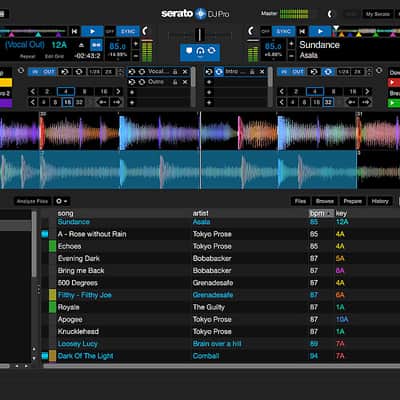
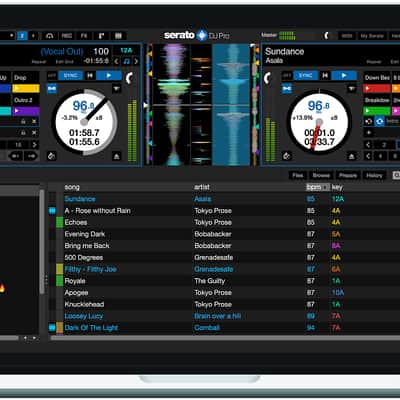
Serato DJ provides ease of use, reliability, hardware connectivity, and everything else one might need in today's DJ realm. Serato DJ is an award winning, digital DJing software used by professionals across the globe.
We’ve combined state of the art features with the world’s best hardware manufacturers to bring you Serato DJ. The industry leader for high‑quality, innovative, and reliable software. Serato DJ is Plug and Play with official hardware, just connect by USB and start mixing.
ROCK SOLID STABILITY
DJs need software they can depend on. We know that better than anyone. It’s why stability has always been a driving force behind our products, along with a dedicated customer support team to help you when you need it. It’s also why Serato is the first choice for the world’s top touring and club DJs.
EASY TO USEMix, blend and scratch your tracks at the touch of a record or platter. Manipulate your music with up to 8 saved cue points and loops per track. You can lock your tracks in time with easy to use Sync options, or turn Sync off and never see it again.
LIBRARY COMPATIBILITYSeamless integration with Pulselocker, iTunes and our crate storage system mean it’s easy to keep your library organized and intuitive. Analyze your music to detect the BPM and Key information. Use the history panel to save your best combos and export playlists for your followers. Stream tracks direct from Pulselocker or store them on your device for offline play.
VIRTUAL DECKSAll the important track information you need is displayed on our famous virtual decks. Get live BPM and track time information as well as visual representation of upcoming cue points and playhead position while scratching.
COLORED WAVEFORMSVisualize your tracks with our unique EQ colored waveforms. Red for bass, blue for treble and green for mid-range. Never miss an incoming vocal or bass drop. Keep your tracks in time with a simple beat matching display next to our waveforms.
FULL DVS SUPPORTUse club standard setups with Serato Control Vinyl or CDs for the perfect emulation of real feel DJing. For turntablists there is the unique sticker lock feature to keep your routines super tight.
RECORDING + SAMPLERRecord your full sets in customizable high quality formats, ready to share with your followers online. Trigger DJ stings, loops, acapellas, drops and whole tracks from the Serato Sampler. Keep up to 32 samples loaded across 4 banks and sync them with your playing tracks.
MIDI SUPPORTAdd ready-mapped official accessories to your setup. Alternatively connect any MIDI device, or remap your primary device however you like to personalise your performances and increase your productivity.
POWERFUL FXA huge array of customizable DJ FX powered by industry leaders iZotope. From the DJ necessities of Filters, Echoes, and Delays to complex and creative noise synths, dubbed out tape echoes and retro 8-bit audio bending FX.
Compatibility
Mac:
- Mac OS Sierra
- Mac OS X 10.11
- Mac OS X 10.10
- Mac OS X 10.9
- i3: 1.07GHz 32 bit, 64 bit
- i5: 1.07GHz 32 bit, 64 bit
- i7: 1.07GHz 32 bit, 64 bit
- 32 bit, 64 bit: 4 GB
- 5 GB free HDD space.
- Available USB 2.0 port.
- Windows 10
- Windows 8.1
- Windows 7
Installation Instructions
Mac:
- Head to the Serato DJ Downloads page and choose "Download Serato DJ for Mac".
- Verify your account if not already logged into Serato.com, as per the example below, and click "Continue"
- You should see a blue banner near the top of your web browser page indicating the SeratoDJ---.dmg file has started downloading, as per the example below. Once this is down, locate the downloaded file and double-click it to start the process.
- Read the terms and conditions that appear, and click "Agree" when you're ready;
- Drag and drop the Serato DJ icon onto your 'Applications' folder icon to begin the installation
- Head to the Serato DJ Downloads page and choose "Download Serato DJ for Win".
- Verify your account if not already logged into Serato.com, as per the example below, and click "Continue";
- You should see a blue banner near the top of your web browser page indicating the SeratoDJ---.zip file has started downloading, as per the example below.
- The Windows installer for Serato DJ comes in a 'archived' zip file, which can be opened with Windows' Explorer, which has archive capabilities, or your favourite third-party archive manager, such as Winzip or 7zip.
- Double-click the resulting Serato DJ exe file from the archive, after extracting or opening the archive to initiate the setup process for Serato DJ. You will be met with the terms and conditions, which you can read, then check the "I agree to the license terms and conditions" tick box, and click "Install";
If using a third-party archive manager, such as Winzip or 7zip, you can simply right-click, and choose from the context sensitive menu options, and select "Extract Here", which will extract the Serato DJ executable file into the folder where you chose to download the original file.
Activation:
Follow these instructions to complete the activation:
- Open Serato DJ.
- Click BUY/ACTIVATE in the Online panel on the right hand side.
- An online window will launch and request your email address. (If you have an existing serato.com or whitelabel.net user account, please use this login email and password.)
- Click "Enter Voucher Code" on Serato DJ in the Online panel.
- Paste your Voucher Code - emailed to you via Reverb SYNC - and click OK.
- After checking for a valid licence, Serato DJ will now be activated, and you can close the online window.