
Sinevibes Dispersion
Price€32.04
Incl. VAT
Instant Download
This listing has ended
See similar gear from other Reverb sellers
Listed:over a month ago
Views:1,152
Watchers:11
Offers:0

Chicago, IL, United States
Our users rate Reverb
Bouncing Ball Delay - From the dreamers at Sinevibes, Dispersion delivers a wide array of delay effects that feature multiple feedback tail shaping and modulation options.
What it is:
A advanced unique delay modeling processor capable of doing bouncing ball delay effects.
How we use it:
Use on guitar tracks to create otherworldly rhythmic effects. Use on drum parts to create polyrhythmic patterns and space.
Why it's cool:
Unlike other ping pong delays, this also Dispersion also allows you to create scatter reflections, shuffle delays, and wide stereo choruses. Dispersion is a unique delay modeling processor. Via a special formula developed at Sinevibes, it configures multiple delay lines so that their times are spread in a non-linear fashion - but always summing up to a defined rhythmical duration. As a result, this delay network sounds like a natural phenomenon, yet with its timing precisely synchronized to the beat. Featuring multiple feedback tail shaping and modulation options, Dispersion is not only capable of doing "bouncing ball delay" effects, but also scattering reflections, shuffle delays, stereo-widening choruses and grainy reverbs.
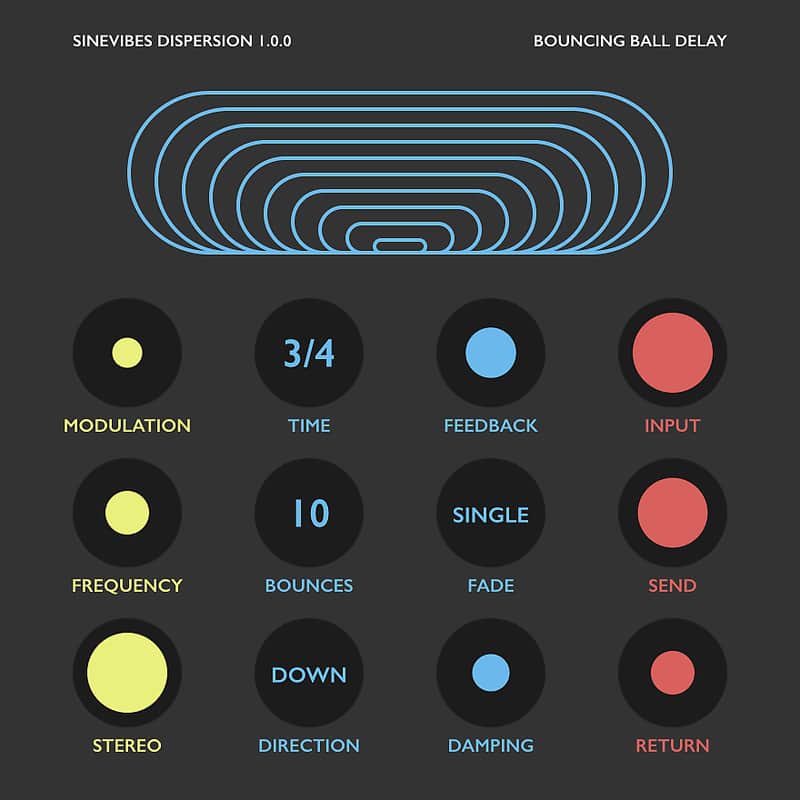
As always in a Sinevibes product, this plugin includes a color-coded user interface with a clean and simple layout. It has good contrast and highly legible typography that work well in both studio and outdoor lighting. Plus, thanks to its animated elements, Dispersion always brings a touch of fun and enjoyment to your workflow.
Specifications SOUND ENGINE
– Up to 16 connected delay lines with non-linear time spread formula.
– Variable feedback with gradual and stepped fade modes.
– Variable low-frequency and high-frequency feedback damping.
– Adjustable delay time modulation with stereo phase offset.
GRAPHIC INTERFACE
– Color-coded control elements with animated transitions between settings.
– Fully hardware-accelerated rendering with support for Retina screen resolution.
Compatibility
Compatibility
System Requirements
Installation Instructions
General Instructions:
What's new?
Dispersion 1.0.4
• More efficient modulation LFO algorithm.
• Fixed validation issue in Logic on macOS 10.14.
• Less obtrusive noise algorithm for plugin’s demo version.
Dispersion 1.0.3
What it is:
A advanced unique delay modeling processor capable of doing bouncing ball delay effects.
How we use it:
Use on guitar tracks to create otherworldly rhythmic effects. Use on drum parts to create polyrhythmic patterns and space.
Why it's cool:
Unlike other ping pong delays, this also Dispersion also allows you to create scatter reflections, shuffle delays, and wide stereo choruses. Dispersion is a unique delay modeling processor. Via a special formula developed at Sinevibes, it configures multiple delay lines so that their times are spread in a non-linear fashion - but always summing up to a defined rhythmical duration. As a result, this delay network sounds like a natural phenomenon, yet with its timing precisely synchronized to the beat. Featuring multiple feedback tail shaping and modulation options, Dispersion is not only capable of doing "bouncing ball delay" effects, but also scattering reflections, shuffle delays, stereo-widening choruses and grainy reverbs.
As always in a Sinevibes product, this plugin includes a color-coded user interface with a clean and simple layout. It has good contrast and highly legible typography that work well in both studio and outdoor lighting. Plus, thanks to its animated elements, Dispersion always brings a touch of fun and enjoyment to your workflow.
Specifications SOUND ENGINE
– Up to 16 connected delay lines with non-linear time spread formula.
– Variable feedback with gradual and stepped fade modes.
– Variable low-frequency and high-frequency feedback damping.
– Adjustable delay time modulation with stereo phase offset.
GRAPHIC INTERFACE
– Color-coded control elements with animated transitions between settings.
– Fully hardware-accelerated rendering with support for Retina screen resolution.
Compatibility
Extremum works with Logic, GarageBand, Live, MainStage, ReNoise, Reaper, Studio One, Digital Performer, Tracktion and other software that supports Audio Unit effect plugins. It comes in 32/64 bit format for Intel Macs running OS X 10.6 or later, and supports Retina screen resolution.
Compatibility
System Requirements
- Dispersion works with Logic, GarageBand, Live, MainStage, ReNoise, Reaper, Studio One, Digital Performer, Tracktion and other software that supports Audio Unit effect plugins.
- It comes in 32/64 bit format for Intel Macs running OS X 10.6 or later, and supports Retina screen resolution.
Installation Instructions
General Instructions:
- We auto-detect your computer operating system, so just click the download button above.
- Find the downloaded plugin (it's in your computer's download folder, or wherever you've chosen to save it) and double click the installer.
- A plugin installer window will open. Simply go through the installation process.
- We will also send you an email with a link to re-download in case you need it.
- If Ableton Live is closed, open it and skip to #5.
- If Ableton Live is already open, go to Preferences.
- Go to Files & Folder.
- Click "Rescan plugins".
- Find the plugin in the Ableton plugins folder in the sidebar.
- Drag-and-drop the plugin onto your track at the bottom of the screen.
- Open Logic Pro X. Newly installed plugins should be detected automatically every time Logic is opened.
- If you've downloaded an effect or utility plugin, these can be used on an insert for any track in the mixer.
- Create a software instrument track if you downloaded a virtual instrument plugin.
- Under Default Patch, go to AU Instruments and choose the plugin you just installed.
- Go to the Reverb SYNC Software and plugin Collection.
- Choose your desired plugin.
- Reverb will auto-detect your platform, so simply click the download button.
- Continue the installation process by following the prompt.
- Hover your mouse over the smart control button.
- Click Show Inspector icon.
- Click on plugins and choose your desired plugin.
What's new?
Dispersion 1.0.4
• More efficient modulation LFO algorithm.
• Fixed validation issue in Logic on macOS 10.14.
• Less obtrusive noise algorithm for plugin’s demo version.
Dispersion 1.0.3
- Reduced processor load thanks to new parameter smoothing algorithm.
- Minor improvements in user interface color scheme.
- Fixed memory usage increasing over time.
- Fixed rare compatibility issue with certain Mac hardware configurations.