Sinevibes Malfunction II
Price€20.99
Incl. VAT
Instant Download
This listing has ended
See similar gear from other Reverb sellers
Listed:over a month ago
Views:966
Watchers:18
Offers:1

Chicago, IL, United States
Our users rate Reverb
Looking to add glitch and spontaneity to the mix? Malfunction's got you covered.
What it is:
A customizable rendition of the charmingly random glitch effect.
How we use it:
Work the dry/wet fader in random mode to underlay chaotic blips and buzzes.
Why it's cool:
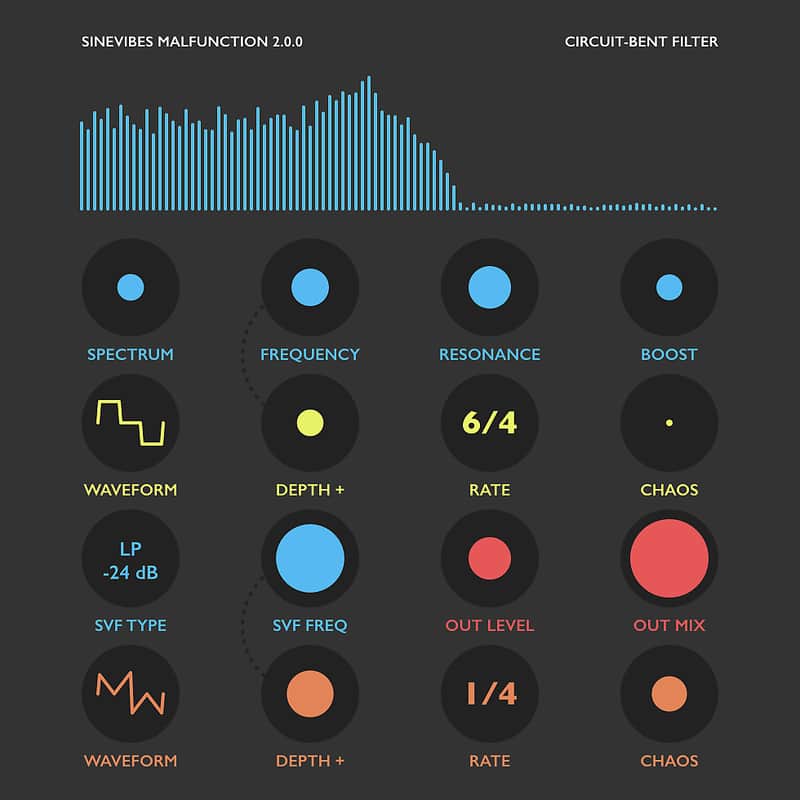
Malfunction pulls off the circuit-bent sounds without coming across as overdone and artificial.Malfunction is a “circuit-bent” filter - a filter with intentionally broken connections and erroneous math that produces very special, hissy and screaming distortion. To tame this dramatic effect the plugin includes a low-pass pre-filter with a booster, as well as an output gate followed by a multi-mode filter. Malfunction also has two highly versatile tempo-synchronized modulation generators routed into the circuit-bent and the output filters for intricate morphing and pulsations: they feature many different waveforms including our special “broken triangle” and “staircase”. Plus, these modulators also offer variable chaos control which gradually adds random, never-repeating accents on each individual waveform cycle.
Malfunction has an intuitive user interface built with Sinevibes trademark color-coded, animated graphics and highly legible shapes and text. Thanks to carefully tuned parameters, superb efficiency and stability, Malfunction is a deeply creative tool that is also very enjoyable day to day.
Sound engine
Compatibility
System Requirements
Installation Instructions
General Instructions:
What's new?
What it is:
A customizable rendition of the charmingly random glitch effect.
How we use it:
Work the dry/wet fader in random mode to underlay chaotic blips and buzzes.
Why it's cool:
Malfunction pulls off the circuit-bent sounds without coming across as overdone and artificial.Malfunction is a “circuit-bent” filter - a filter with intentionally broken connections and erroneous math that produces very special, hissy and screaming distortion. To tame this dramatic effect the plugin includes a low-pass pre-filter with a booster, as well as an output gate followed by a multi-mode filter. Malfunction also has two highly versatile tempo-synchronized modulation generators routed into the circuit-bent and the output filters for intricate morphing and pulsations: they feature many different waveforms including our special “broken triangle” and “staircase”. Plus, these modulators also offer variable chaos control which gradually adds random, never-repeating accents on each individual waveform cycle.
Malfunction has an intuitive user interface built with Sinevibes trademark color-coded, animated graphics and highly legible shapes and text. Thanks to carefully tuned parameters, superb efficiency and stability, Malfunction is a deeply creative tool that is also very enjoyable day to day.
Sound engine
- Unique “circuit-bent” filter algorithm producing thick, hissy and screaming distortion.
- Multi-mode state-variable filter with 8 algorithms for detailed output spectrum shaping.
- Two modulation generators with 10 waveforms and variable chaos.
- Transport sync with support for tempo and time signature changes.
- Color-coded controls with lightly animated transitions.
- Fully hardware-accelerated rendering with support for Retina screen resolution.
Compatibility
System Requirements
- Inertia works with Logic, GarageBand, Live, MainStage, ReNoise, Reaper, Studio One, Digital Performer, Tracktion and other software that supports Audio Unit effect plugins.
- It comes in 32/64 bit format for Intel Macs running OS X 10.6 or later, and supports Retina screen resolution.
Installation Instructions
General Instructions:
- We auto-detect your computer operating system, so just click the download button above.
- Find the downloaded plugin (it's in your computer's download folder, or wherever you've chosen to save it) and double click the installer.
- A plugin installer window will open. Simply go through the installation process.
- We will also send you an email with a link to re-download in case you need it.
- If Ableton Live is closed, open it and skip to #5.
- If Ableton Live is already open, go to Preferences.
- Go to Files & Folder.
- Click "Rescan plugins".
- Find the plugin in the Ableton plugins folder in the sidebar.
- Drag-and-drop the plugin onto your track at the bottom of the screen.
- Open Logic Pro X. Newly installed plugins should be detected automatically every time Logic is opened.
- If you've downloaded an effect or utility plugin, these can be used on an insert for any track in the mixer.
- Create a software instrument track if you downloaded a virtual instrument plugin.
- Under Default Patch, go to AU Instruments and choose the plugin you just installed.
- Go to the Reverb SYNC Software and plugin Collection.
- Choose your desired plugin.
- Reverb will auto-detect your platform, so simply click the download button.
- Continue the installation process by following the prompt.
- Hover your mouse over the smart control button.
- Click Show Inspector icon.
- Click on plugins and choose your desired plugin.
What's new?
Malfunction 2.0.1
- Fixed continuous plugin parameters that were incorrectly specified as binary.
- Added new factory presets.
Update 2.0.0
- Completely new product, redesigned inside and out.
- All-new hardware-accelerated user interface graphics.
- Built-in gate to prevent endless self-oscillation.
- Two freshly developed modulation generators with new "broken triangle" and "broken saw" waveforms.
- Much improved computational efficiency with 2.5x reduced processor load.
- Added new LFO waveforms: notch, 3x staircase, 4x staircase. Multiple user interface retouches.