
Waves Reel ADT - Artificial Double Tracking Plugin
New Price€231.85
Instant Download
This gear has sold
See similar gear from other Reverb sellers
Listed:over a month ago
Views:1,588
Saves:19
Offers:6

Chicago, IL, United States
Our users rate Reverb
All the quirk and warmth of the ADT sound paired with the control of a digital plugin.
What it is:
Digital emulation of the famed Artificial Double Tracking process pioneered at Abbey Road.
How we use it:
Be it The Beatles' signature vocal effects or experimental flanging drums, Reel ADT sounds fantastic, with some tweaking, across all instruments.
Why it's cool:
Simply put, Reel ADT adds character to any track it touches.Waves/Abbey Road Reel ADT is the first plugin to successfully emulate Abbey Road Studios’ pioneering process of Artificial Double Tracking. The effect that would become an integral part of Abbey Road’s signature sound was initially created at the famed studios in the 1960s to meet the needs of some very special clients: The Beatles.
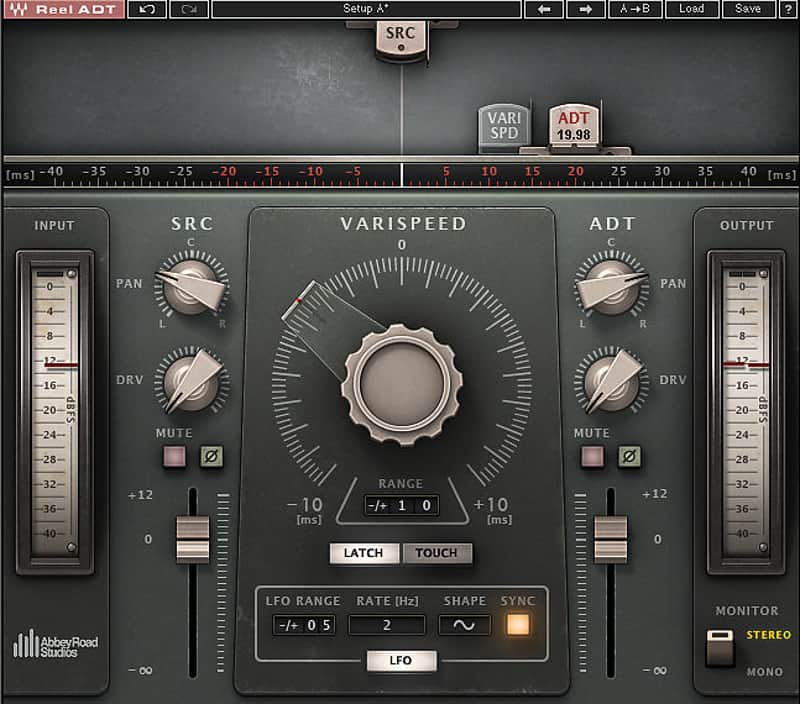
Reel ADT puts the magic of that era in your hands within seconds. Using its intuitive controls, you can advance or delay the doubled signal to achieve genuine, lush-sounding delay and pitch variations. You can also drive each of the signals separately to add beautiful tape saturations.
With its authentic modeled valve tape machine sound and faithful emulation of wow and flutter, this extraordinary plugin can enhance any track with the impression of two separate takes, giving you results as close as possible to real double tracking. Other classic Abbey Road tape effects such as flanging and phasing can also be achieved with ease.
All the character, depth and panoramic sound of this inimitable classic effect can now be created digitally, simply and for real: Reel ADT.
Compatibility
Running Reel ADT on a Mac OS:
CPU
Memory
Operating System
Screen Resolution
Supported Hosts - Mac:
Running Reel ADT on a Windows OS:
CPU
Memory
Operating System
Screen Resolution
Supported Hosts - Windows:
Installation Instructions
What it is:
Digital emulation of the famed Artificial Double Tracking process pioneered at Abbey Road.
How we use it:
Be it The Beatles' signature vocal effects or experimental flanging drums, Reel ADT sounds fantastic, with some tweaking, across all instruments.
Why it's cool:
Simply put, Reel ADT adds character to any track it touches.Waves/Abbey Road Reel ADT is the first plugin to successfully emulate Abbey Road Studios’ pioneering process of Artificial Double Tracking. The effect that would become an integral part of Abbey Road’s signature sound was initially created at the famed studios in the 1960s to meet the needs of some very special clients: The Beatles.
Reel ADT puts the magic of that era in your hands within seconds. Using its intuitive controls, you can advance or delay the doubled signal to achieve genuine, lush-sounding delay and pitch variations. You can also drive each of the signals separately to add beautiful tape saturations.
With its authentic modeled valve tape machine sound and faithful emulation of wow and flutter, this extraordinary plugin can enhance any track with the impression of two separate takes, giving you results as close as possible to real double tracking. Other classic Abbey Road tape effects such as flanging and phasing can also be achieved with ease.
All the character, depth and panoramic sound of this inimitable classic effect can now be created digitally, simply and for real: Reel ADT.
- Developed in association with Abbey Road Studios
- Genuine tape-sounding ADT plugin
- For the first time ever, a full exact recall automation of the ADT effect
- Different tape sounds for source and ADT signals
- Exclusive 2-voice component
- Separate drive control for each path
- Manual and automatic control
- MIDI-assignable manual control for the most authentic user experience possible
- Special components for optimal, low-latency performance in live shows (doubled signal can only be delayed)
Compatibility
Running Reel ADT on a Mac OS:
CPU
- Intel Core i3 / i5 / i7 / Xeon
Memory
- 4 GB RAM
- 4 GB free disk space
Operating System
- 10.9.5 - 10.12.1
- 10.8.5 for ProTools 10 only
Screen Resolution
- Minimum: 1024x768
- Recommended: 1280x1024 / 1600x1024
- USB displays are not supported as the primary display.
Supported Hosts - Mac:
- Pro Tools 11.3.2 - 12.6 (AAX Native 64-bit, Audiosuite)
- Pro Tools 10.3.10 (RTAS, Audiosuite)
- Logic Pro X 10.2 - 10.2.4 (Audio Units)
- Digital Performer 9.0 - 9.1.2 (Audio Units)
- Ableton Live 9.2.2 - 9.7 (VST)
- Nuendo 7.0.20 - 7.1 (VST3)
- Cubase 8.0.30 - 8.5 (VST3)
- WaveLab 9.0.10 - 9.0.15 (VST3)
- Main Stage 3.2 - 3.2.3 (Audio Units)
- Garage Band 10.1.0 - 10.1.3 (Audio Units)
- Audition CC2015, CC2017 (VST3)
- Adobe Premiere CC2015, CC2017 (VST3)
- Final Cut Pro X 10.2.2 - 10.2.3 (Audio Units)
- Studio One 3.1 - 3.3.1 (VST3)
- Media Composer 8.6.3 - 8.6.4 (AAX Native)
- Sound Forge Pro 2.5 (Audio Units)
- REAPER 5.18 - 5.22 (VST3)
Running Reel ADT on a Windows OS:
CPU
- Intel Core i3 / i5 / i7 / Xeon / AMD Quad-Core
Memory
- 4 GB RAM
- 4 GB free disk space
Operating System
- Windows 7 with SP1 64 bit
- Windows 8.1 64 bit
- Windows 10 64 bit
Screen Resolution
- Minimum: 1024x768
- Recommended: 1280x1024 / 1600x1024
Supported Hosts - Windows:
- Pro Tools 11.3.2 - 12.6 (AAX Native 64-bit, Audiosuite)
- Pro Tools 10.3.8 - 10.3.10 (RTAS, Audiosuite)
- Ableton Live 9.1.6 - 9.7 (VST)
- Nuendo 6.5.35 - 7.1 (VST3)
- Cubase 7.5.30 - 8.5 (VST3)
- WaveLab 8.5, 9.0.10 - 9.0.15 (VST3)
- Sonar X3e (VST3), Platinum (VST3)
- Sound Forge 10.0e, 11 (VST)
- Vegas Pro 12 - 14 (VST)
- Acid 7.0e (VST)
- Audition CC2014, CC2015, CC2017 (VST3)
- Adobe Premiere CC2014, CC2015, CC2017 (VST3)
- Samplitude Pro X (VST), Pro X2 (VST), Pro X3 (VST)
- Sequoia 12 - 13 (VST)
- Pyramix 9.0.7 - 9.1.6 (VST)
- Studio One 3.1 - 3.3.1 (VST3)
- Media Composer 7.0.4 (RTAS), 8.6.3 - 8.6.4 (AAX Native)
- FL Studio 12.1.3 - 12.4 (VST3)
- REAPER 5.18 - 5.22 (VST3)
Installation Instructions
- Create an account: https://www.waves.com/create-account (if you have an account, skip this step)
- Register the serial number we emailed: https://www.waves.com/account/register
- Download and install Waves Central for Mac | Windows.
- If you already have Waves Central installed, skip to step 4. - Launch Waves Central.
- Windows: via the desktop shortcut or Start Menu > All Programs > Waves.
- Mac: Applications > Waves Central. - Log into Waves Central using your Waves account information.
- Click on Easy Install & Activate.
- Select the products you wish to install & activate on this computer.
- Click on the Install & Activate button.