AUDIONAMIX XTRAX STEMS - Audio Separation Plugin (Download)
New Price€76.18
Incl. VAT
Instant Download
This gear has sold
See similar gear from other Reverb sellers
Listed:over a month ago
Views:2,625
Saves:9
Offers:4

Chicago, IL, United States
Our users rate Reverb
One song in, three stems out.
What it is:
An innovative tool which separates a recording of any song into three or more stem files.
How we use it:
Remove different parts of song to remix, learn, or play along with your favorite recording.
Why it's cool:
Give new life to any recording by separating the different musical parts out for further arrangement and creation. AUDIONAMIX XTRAX STEMS - Audio Separation - Create Stems From Any Song
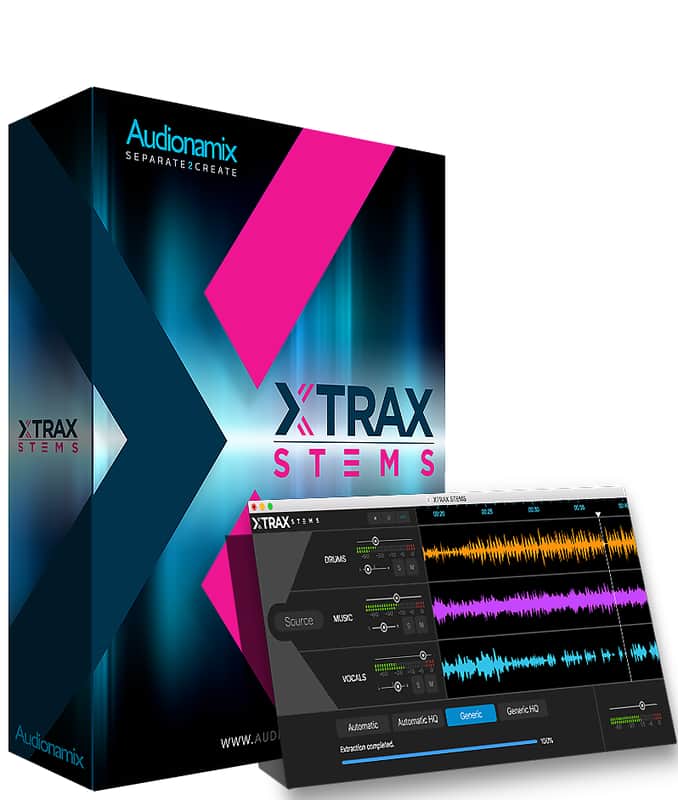
Audionamix, the industry leader in audio source separation, is officially releasing XTRAX STEMS, the world’s first fully-automatic stem creator. XTRAX STEMS can easily separate any song into its drum, vocal and remaining music components. Created for DJs, music producers and remix artists, XTRAX STEMS allows users to create multitrack content to control during live sets, opening up possibilities for easy remixing, sampling and a capella creation like never before!
XTRAX STEMS can be used also by musicians to practice along with their favorite tracks. Singers and drummers can play along with the song with the vocals or drums turned off. They can also listen to soloed vocal or drum parts to spot all the details of the original performance, vocal harmonies, and mixing techniques.
Features:
Compatibility
Installation Instructions
Mac OS X
You can also manually copy and paste it into the correct location, depending on the version you’re installing:
- AAX plugin should be in this folder: /Library/Application Support/Avid/Audio/Plug-Ins/
- VST plugin should be in this folder: /Library/Audio/Plug-Ins/VST
- AU plugin should be in this folder: /Library/Audio/Plug-Ins/Components
What it is:
An innovative tool which separates a recording of any song into three or more stem files.
How we use it:
Remove different parts of song to remix, learn, or play along with your favorite recording.
Why it's cool:
Give new life to any recording by separating the different musical parts out for further arrangement and creation. AUDIONAMIX XTRAX STEMS - Audio Separation - Create Stems From Any Song
Audionamix, the industry leader in audio source separation, is officially releasing XTRAX STEMS, the world’s first fully-automatic stem creator. XTRAX STEMS can easily separate any song into its drum, vocal and remaining music components. Created for DJs, music producers and remix artists, XTRAX STEMS allows users to create multitrack content to control during live sets, opening up possibilities for easy remixing, sampling and a capella creation like never before!
XTRAX STEMS can be used also by musicians to practice along with their favorite tracks. Singers and drummers can play along with the song with the vocals or drums turned off. They can also listen to soloed vocal or drum parts to spot all the details of the original performance, vocal harmonies, and mixing techniques.
Features:
- Automatically Separate Songs into Drums, Vocals and Music Stems
- Export Individual Stems as Audio Files
- Create and Export a New Volume and Pan Mix
- Works on Mono and Stereo Files
- Works on audio files up to 96 kHz, 32 bits
- Offers four powerful cloud-based separation algorithms to tailor the separation to your particular file
Compatibility
- Mac-Only (Mac OS X 10.11 – 10.13)
- Requires High-Speed Internet Connection
Installation Instructions
- Create or login to your Audionamix account here.
- Afterwards, login to your Audionamix account and follow the activation link here.
- The first time you insert and open the SVC plug-in, you will have to authorize it. To do so, click the Preferences button and enter the username and API key that you received when you purchased SVC.
Mac OS X
- Open the SVC.dmg file.
- Make sure that no DAWs are running and simply drag and drop the plugin icon into the folder alias.
You can also manually copy and paste it into the correct location, depending on the version you’re installing:
- AAX plugin should be in this folder: /Library/Application Support/Avid/Audio/Plug-Ins/
- VST plugin should be in this folder: /Library/Audio/Plug-Ins/VST
- AU plugin should be in this folder: /Library/Audio/Plug-Ins/Components
| Brand | |
|---|---|
| Model |
|
| Categories |
Product safety information may be available here.