
Sinevibes Emission
Price€31.78
Incl. VAT
Instant Download
This listing has ended
See similar gear from other Reverb sellers
Listed:over a month ago
Views:821
Watchers:5
Offers:0

Chicago, IL, United States
Our users rate Reverb
Emission - Reverb for the experimentalist, and so much more.
What it is:
An off-color, versatile reverb for the sonic explorer.
How we use it:
Add movement and dimension to a track.
Why it’s cool:
Emission does reverb differently than most everything on the market, but still retains musical qualities to guarantee its rightful place in a mix.Emission is a special processor for creating unreal, out-of-this-world space effects. At its core is a smooth reverb engine based on a traditional "feedback delay network" design, but it breaks out of ordinary with what's inside that network. The spectrum of the signal in the feedback matrix is recursively processed using either a Bode frequency shifter or a granular pitch shifter – coupled with variable time modulation and low- or high-pass damping, this gives birth to a wide variety of novel reverb sounds which can only be described as "vibrating vapor", "jet sky", "frozen air" or even "ambient apocalypse". Emission works its magic on almost any sound source, smooth or percussive – and its versatility is as high as your willingness to experiment.
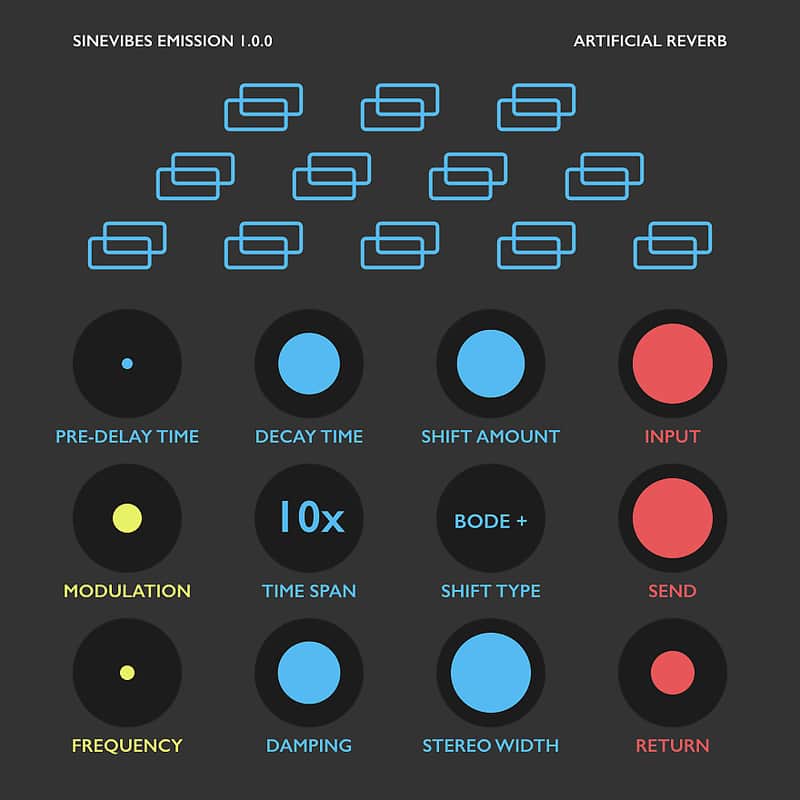
As always in a Sinevibes product, Emission includes a color-coded user interface with a clean and simple layout. It has good contrast and highly legible typography that work well in both studio and outdoor lighting. Plus, thanks to its animated elements, Emission always brings a touch of fun and enjoyment to your workflow.
Sound Engine:
Graphic Interface:
Compatibility:
Compatibility
System Requirements
Installation Instructions
General Instructions:
What's new?
Emission 1.0.2
What it is:
An off-color, versatile reverb for the sonic explorer.
How we use it:
Add movement and dimension to a track.
Why it’s cool:
Emission does reverb differently than most everything on the market, but still retains musical qualities to guarantee its rightful place in a mix.Emission is a special processor for creating unreal, out-of-this-world space effects. At its core is a smooth reverb engine based on a traditional "feedback delay network" design, but it breaks out of ordinary with what's inside that network. The spectrum of the signal in the feedback matrix is recursively processed using either a Bode frequency shifter or a granular pitch shifter – coupled with variable time modulation and low- or high-pass damping, this gives birth to a wide variety of novel reverb sounds which can only be described as "vibrating vapor", "jet sky", "frozen air" or even "ambient apocalypse". Emission works its magic on almost any sound source, smooth or percussive – and its versatility is as high as your willingness to experiment.
As always in a Sinevibes product, Emission includes a color-coded user interface with a clean and simple layout. It has good contrast and highly legible typography that work well in both studio and outdoor lighting. Plus, thanks to its animated elements, Emission always brings a touch of fun and enjoyment to your workflow.
Sound Engine:
- Feedback delay network with 8x8 Hadamard matrix, spline interpolation, all-pass diffusion filters.
- Bode frequency shifter or granular pitch shifter inside feedback (both positive or negative).
- Variable low- or high-frequency damping and initial stereo width.
- Wide-range time modulation for reverb tail.
Graphic Interface:
- Color-coded control elements with animated transitions between settings.
- Fully hardware-accelerated rendering with support for Retina screen resolution.
Compatibility:
- Works with any application that supports Audio Unit effect plugins.
- Supports OS X 10.6 or later running on 32 or 64 bit Intel Macs.
Compatibility
System Requirements
- Emission works with Logic, GarageBand, Live, MainStage, ReNoise, Reaper, Studio One, Digital Performer, Tracktion and other software that supports Audio Unit effect plugins.
- It comes in 32/64 bit format for Intel Macs running OS X 10.6 or later, and supports Retina screen resolution.
Installation Instructions
General Instructions:
- We auto-detect your computer operating system, so just click the download button above.
- Find the downloaded plugin (it's in your computer's download folder, or wherever you've chosen to save it) and double click the installer.
- A plugin installer window will open. Simply go through the installation process.
- We will also send you an email with a link to re-download in case you need it.
- If Ableton Live is closed, open it and skip to #5.
- If Ableton Live is already open, go to Preferences.
- Go to Files & Folder.
- Click "Rescan plugins".
- Find the plugin in the Ableton plugins folder in the sidebar.
- Drag-and-drop the plugin onto your track at the bottom of the screen.
- Open Logic Pro X. Newly installed plugins should be detected automatically every time Logic is opened.
- If you've downloaded an effect or utility plugin, these can be used on an insert for any track in the mixer.
- Create a software instrument track if you downloaded a virtual instrument plugin.
- Under Default Patch, go to AU Instruments and choose the plugin you just installed.
- Go to the Reverb SYNC Software and plugin Collection.
- Choose your desired plugin.
- Reverb will auto-detect your platform, so simply click the download button.
- Continue the installation process by following the prompt.
- Hover your mouse over the smart control button.
- Click Show Inspector icon.
- Click on plugins and choose your desired plugin.
What's new?
Emission 1.0.2
- Reduced processor load thanks to new parameter smoothing algorithm.
- Minor improvements in user interface color scheme.