Waves REDD
New Pricekr.1,682.67
Instant Download
This gear has sold
See similar gear from other Reverb sellers
Listed:over a month ago
Views:898
Saves:14
Offers:1

Chicago, IL, United States
Our users rate Reverb
The heart of Abbey Road's '60s sound.
What it is:
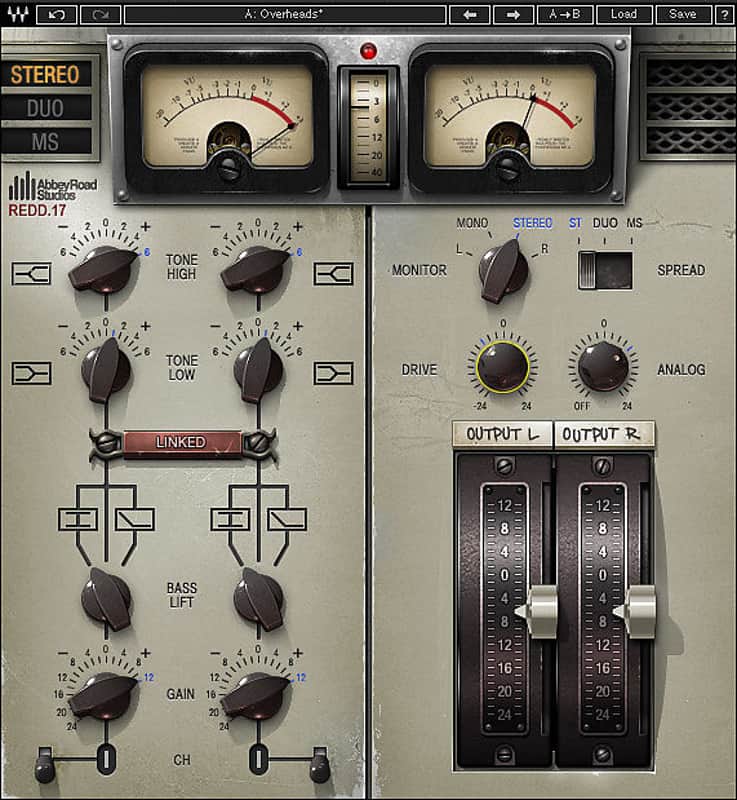
A meticulous recreation of Abbey Road's REDD consoles.
How we use it:
Bring the tonal complexities and color of studio icons to a track.
Why it's cool:
REDD adds a few one-of-a-kind pieces to your in-the-box recordings. London's Abbey Road Studios were at the epicenter of a seismic shift that rocked the world of music during the 1960s, and changed the course of popular culture forever. The Beatles, The Hollies, Pink Floyd and countless other luminaries made musical history at Abbey Road Studios, trailblazing a revolution that resonates to this day.
And at the heart of it all: The REDD consoles, custom-designed, built by and named for Abbey Road Studios' in-house Record Engineering Development Department. Renowned for their silky smooth EQ curves, extraordinary warmth and lush stereo imagery, there’s something magical about the REDDs that sound like no other consoles.
Waves meticulously recreated the color, character and tonal complexity of the original desks: The REDD.17 which still belongs to Abbey Road Studios, and the REDD.37 console now owned by Lenny Kravitz. The result is an impressive pair of plugins that deliver the dimension, depth and richness of these console classics.
Compatibility
Mac:
CPU
Memory
Operating System
Screen Resolution
Support for Visually Impaired Users
Windows:
CPU
Memory
Operating System
Screen Resolution
Installation Instructions
What it is:
A meticulous recreation of Abbey Road's REDD consoles.
How we use it:
Bring the tonal complexities and color of studio icons to a track.
Why it's cool:
REDD adds a few one-of-a-kind pieces to your in-the-box recordings. London's Abbey Road Studios were at the epicenter of a seismic shift that rocked the world of music during the 1960s, and changed the course of popular culture forever. The Beatles, The Hollies, Pink Floyd and countless other luminaries made musical history at Abbey Road Studios, trailblazing a revolution that resonates to this day.
And at the heart of it all: The REDD consoles, custom-designed, built by and named for Abbey Road Studios' in-house Record Engineering Development Department. Renowned for their silky smooth EQ curves, extraordinary warmth and lush stereo imagery, there’s something magical about the REDDs that sound like no other consoles.
Waves meticulously recreated the color, character and tonal complexity of the original desks: The REDD.17 which still belongs to Abbey Road Studios, and the REDD.37 console now owned by Lenny Kravitz. The result is an impressive pair of plugins that deliver the dimension, depth and richness of these console classics.
- Based on the legendary REDD.17, REDD.37 and REDD.51 consoles
- Delivers the classic British sound of the 1960s
- Continuous EQ controls
- Developed in association with Abbey Road Studios
Compatibility
Mac:
CPU
- Intel Core i5 / i7 / Xeon
Memory
- 8 GB RAM
- 8 GB free disk space on the system drive
Operating System
- 10.10.5 - 10.12.5
Screen Resolution
- Minimum: 1024x768
- Recommended: 1280x1024 / 1600x1024
- USB displays are not supported as the primary display.
Support for Visually Impaired Users
- Mac OS Sierra 10.12.4
- VoiceOver Utility enabled
- Pro Tools 12.7
- Logic 10.3.1
- Please note: Preset management via the WaveSystem Toolbar is currently not supported (will be added soon).
Windows:
CPU
- Intel Core i3 / i5 / i7 / Xeon / AMD Quad-Core
Memory
- 4 GB RAM
- 8 GB free disk space on the system drive
Operating System
- Windows 7 with SP1 64 bit
- Windows 8.1 64 bit
- Windows 10 64 bit
Screen Resolution
- Minimum: 1024x768
- Recommended: 1280x1024 / 1600x1024
Installation Instructions
- Create an account: https://www.waves.com/create-account (if you have an account, skip this step)
- Register the serial number we emailed: https://www.waves.com/account/register
- Download and install Waves Central for Mac | Windows.
- If you already have Waves Central installed, skip to step 4. - Launch Waves Central.
- Windows: via the desktop shortcut or Start Menu > All Programs > Waves.
- Mac: Applications > Waves Central. - Log into Waves Central using your Waves account information.
- Click on Easy Install & Activate.
- Select the products you wish to install & activate on this computer.
- Click on the Install & Activate button.