Krotos Audio Weaponiser Fully Loaded
PriceR$3,246.32
Instant Download
This listing has ended
See similar gear from other Reverb sellers
Listed:over a month ago
Views:2,192
Watchers:8
Offers:0

Chicago, IL, United States
Our users rate Reverb
The ultimate weapon sound design solution.
What it is:
An all-encompassing, weapon sound design tool.
How we use it:
Craft and manipulate convincing weapon sounds.
Why it's cool:
Music producers can also access included drum presets to layer beats.
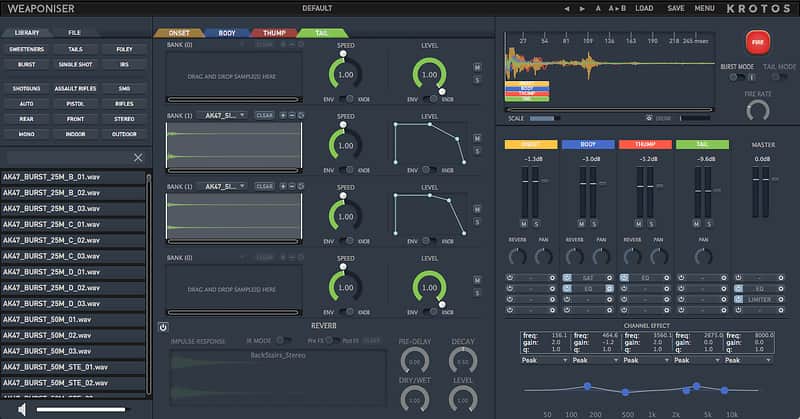
Choose from our comprehensive library of professionally recorded, real-world Shotguns, Rifles, Machine Guns, Assault rifles, Pistols and weapon Foley. Combine with Sweeteners and IRs, easily accessible via our tag-driven browser via simple drag-and-drop and available in a variety of different mic positioning’s. Import these into our customized engines to design constituent elements and layers of shots with ease – Onset, Body, Thump and Tail. Weaponiser also includes a huge range of designed presets, straight out of the box to get you started immediately.
Bullet Proof Your Sound Design
Add in-depth variation to your weapons quickly and easily. Edit and randomize Envelope or Knob Speed and Level for each bank, activate the Synth button to synthesize and process with Pitch, FM or AM synthesis, choose from a selection of Carriers and Modulators, Pitch, Duration, Gain and edit Amplitude and Amount Envelopes. Use MIDI to trigger your engines and velocity sensitivity to program or perform precise variations.
Fire-arm Your FX
Utilise our FX panel and use EQ, Compression, Limiting, Saturation, Ring Modulation, Flanging, Transient Shaping and Noise Gating to amp-up your weapons for that hyper-real sound, subtly tweak or totally destroy! Further chain your FX to effortlessly build up complex signal flows.
Sequence or offset your sounds to a built-in timeline, allowing for more precise micro-timings between engines. Hit the Fire button to audition, activate Burst mode to create automatic weapons from single shot assets, adjust the Fire Rate for creating different loop speeds or press the Drunk button to randomize your timeline sequences, making each shot sound subtly different.
Export To The Battlefield
Easily combine Weaponiser with your existing workflow, or process individual engine outputs and your favourite plugins with ease. Break out your weapon elements onto a mixer for intuitive tweaking and dynamic mixing, and quickly render layers for easy export to in-game engines or your DAW.
Compatibility
Mac
Installation Instructions
What it is:
An all-encompassing, weapon sound design tool.
How we use it:
Craft and manipulate convincing weapon sounds.
Why it's cool:
Music producers can also access included drum presets to layer beats.
The ultimate weapon sound design solution, Weaponiser Fully Loaded extends the power of Weaponiser Basic by offering our most comprehensive library of professionally recorded weapon sounds.
Weaponiser Fully Loaded offers a total of 2288 assets, 1596 edited Weapon recordings, 13 weapons, 692 sweeteners and 39 IRs and 135 presets.
Beat makers and music producers can also access our collection of drum presets to layer up and customize their own loops and kits.
Load Up Your Audio AmmunitionChoose from our comprehensive library of professionally recorded, real-world Shotguns, Rifles, Machine Guns, Assault rifles, Pistols and weapon Foley. Combine with Sweeteners and IRs, easily accessible via our tag-driven browser via simple drag-and-drop and available in a variety of different mic positioning’s. Import these into our customized engines to design constituent elements and layers of shots with ease – Onset, Body, Thump and Tail. Weaponiser also includes a huge range of designed presets, straight out of the box to get you started immediately.
Bullet Proof Your Sound Design
Add in-depth variation to your weapons quickly and easily. Edit and randomize Envelope or Knob Speed and Level for each bank, activate the Synth button to synthesize and process with Pitch, FM or AM synthesis, choose from a selection of Carriers and Modulators, Pitch, Duration, Gain and edit Amplitude and Amount Envelopes. Use MIDI to trigger your engines and velocity sensitivity to program or perform precise variations.
Fire-arm Your FX
Utilise our FX panel and use EQ, Compression, Limiting, Saturation, Ring Modulation, Flanging, Transient Shaping and Noise Gating to amp-up your weapons for that hyper-real sound, subtly tweak or totally destroy! Further chain your FX to effortlessly build up complex signal flows.
Sequence or offset your sounds to a built-in timeline, allowing for more precise micro-timings between engines. Hit the Fire button to audition, activate Burst mode to create automatic weapons from single shot assets, adjust the Fire Rate for creating different loop speeds or press the Drunk button to randomize your timeline sequences, making each shot sound subtly different.
Export To The Battlefield
Easily combine Weaponiser with your existing workflow, or process individual engine outputs and your favourite plugins with ease. Break out your weapon elements onto a mixer for intuitive tweaking and dynamic mixing, and quickly render layers for easy export to in-game engines or your DAW.
Compatibility
Mac
- Mac Intel computer with a minimum of 2.4 GHz Intel Dual Core Processor
- 4 GB of RAM
- OS X 10.9 or later
- 5.46 GB Hard Disk space
- 2.4 GHz Intel Dual Core Processor
- 4 GB of RAM
- Windows 7 64-bit or above
- This software is a digital download
- Formats (64-bit only): AAX Native/AudioSuite, VST, AU
- Minimum sample rate: 44.1 kHz
- Maximum sample rate: 192 kHz
- An internet connection is required at the time of activation
- Screen resolution of 1280×1024 or higher
- An iLok account (available for free at ilok.com) is required to activate and use both the demo and full version of the software
- Weaponiser can only be activated on one computer at a time
- An iLok 2 or later is required for dongle use
- Supported host applications: Pro Tools (11 or later), Logic Pro X, Nuendo, Live, Cubase, Reaper and Ableton Live
Installation Instructions
- Visit the Weaponiser product page and download the free demo.
- Run the demo installer. This will place VST/AU/AAX versions in the correct locations on your system automatically. It will also install various assets required to run the plugin.
- Then, you will then need to download iLok License Manager. Your license will allow you to use the plugin on one computer at a time. You may need to update to the latest version of iLok license Manager to use the plugins. You do NOT need an iLok dongle/USB key to use the plugin.
- Log into your account using the iLok License Manager. You will find a the ‘Weaponiser’ license in the main window (on the right-hand side). These will appear in BOLD. Click and drag these licenses to a location on the left-hand side. You can activate to either the local machine or an iLok2.
- Directly in the iLok License
Manager, use the ‘Redeem an Activation Code’ option in the top right-hand corner.
- Paste the license - emailed to you via Reverb.
- Open an instance of Weaponiser in your DAW.
- You're good to go!
| Brand | |
|---|---|
| Model |
|
| Categories |
Product safety information may be available here.