Cableguys VolumeShaper 5
New Price€10.30
Incl. VAT
Instant Download
This gear has sold
See similar gear from other Reverb sellers
Listed:over a month ago
Views:278
Watchers:12
Offers:0

Chicago, IL, United States
Our users rate Reverb
For dynamic mixes and pinpoint sound.
What it is:
A creative volume-based effect.
How we use it:
Craft stutters, extreme gates, and more.
Why it's cool:
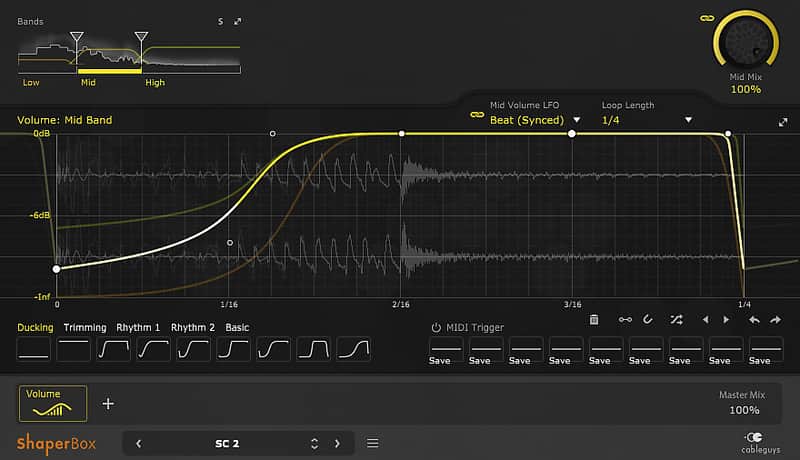
The ability to draw your volume curves allows you to manipulate your audio, the way you want it, with extreme precision. VolumeShaper lets you shape the levels of any audio signal in pinpoint detail.
From multiband sidechain compression effects to extreme gating, from tempo-synced stutter to precise sample-shaping — VolumeShaper provides a wealth of creative musical effects with a visual approach to volume.
VolumeShaper features multiband waveform-based editing, a comprehensive selection of preset curves, a precise oscilloscope, a big spectrum view and an updated preset library. It runs sample-accurate in sync with your DAW, in Hz mode up to the audible range or retriggered via MIDI.
New for version 5, VolumeShaper now runs inside Cableguys' exclusive new ShaperBox creative effects rack. Use VolumeShaper on its own, or stack it up with other Cableguys Shapers to create elaborate, multilayered effects for your productions. Take advantage of the new MIDI Trigger system to switch curves on the fly with the press of a MIDI key. And enjoy improved CPU and RAM efficiency along with even better-sounding interpolation.
Compatibility
Windows:
Installation Instructions
Once you download VolumeShaper 5, you will receive a license key by email which will then need to be registered at www.cableguys.com
What it is:
A creative volume-based effect.
How we use it:
Craft stutters, extreme gates, and more.
Why it's cool:
The ability to draw your volume curves allows you to manipulate your audio, the way you want it, with extreme precision. VolumeShaper lets you shape the levels of any audio signal in pinpoint detail.
From multiband sidechain compression effects to extreme gating, from tempo-synced stutter to precise sample-shaping — VolumeShaper provides a wealth of creative musical effects with a visual approach to volume.
VolumeShaper features multiband waveform-based editing, a comprehensive selection of preset curves, a precise oscilloscope, a big spectrum view and an updated preset library. It runs sample-accurate in sync with your DAW, in Hz mode up to the audible range or retriggered via MIDI.
New for version 5, VolumeShaper now runs inside Cableguys' exclusive new ShaperBox creative effects rack. Use VolumeShaper on its own, or stack it up with other Cableguys Shapers to create elaborate, multilayered effects for your productions. Take advantage of the new MIDI Trigger system to switch curves on the fly with the press of a MIDI key. And enjoy improved CPU and RAM efficiency along with even better-sounding interpolation.
Compatibility
Windows:
- 2 GHz CPU with SSE2 support
- Windows 7, 8 or 10
- VST host sequencer
- 32- or 64-bit
- 2 GHz Intel CPU
- Mac OS X 10.8 or later
- VST or AU host sequencer
- 32- or 64-bit
Installation Instructions
Once you download VolumeShaper 5, you will receive a license key by email which will then need to be registered at www.cableguys.com
- If Ableton Live is closed, open it and skip to #5.
- If Ableton Live is already open, go to Preferences.
- Go to Files & Folder.
- Click "Rescan plugins".
- Find the plugin in the Ableton plugins folder in the sidebar.
- Drag-and-drop the plugin onto your track at the bottom of the screen.
- Open Logic Pro X. Newly installed plugins should be detected automatically every time Logic is opened.
- If you've downloaded an effect or utility plugin, these can be used on an insert for any track in the mixer.
- Create a software instrument track if you downloaded a virtual instrument plugin.
- Under Default Patch, go to AU Instruments and choose the plugin you just installed.
- Go to the Reverb SYNC Software and plugin Collection.
- Choose your desired plugin.
- Reverb will auto-detect your platform, so simply click the download button.
- Continue the installation process by following the prompt.
- Hover your mouse over the smart control button.
- Click Show Inspector icon.
- Click on plugins and choose your desired plugin.