Audified inTone 2 Solo
This listing has ended
See similar gear from other Reverb sellers

Our users rate Reverb
What it is:
A unique yet familiar take on a live FX processor.
How we use it:
Shape sounds both on the fly and in the studio.
Why it's cool:
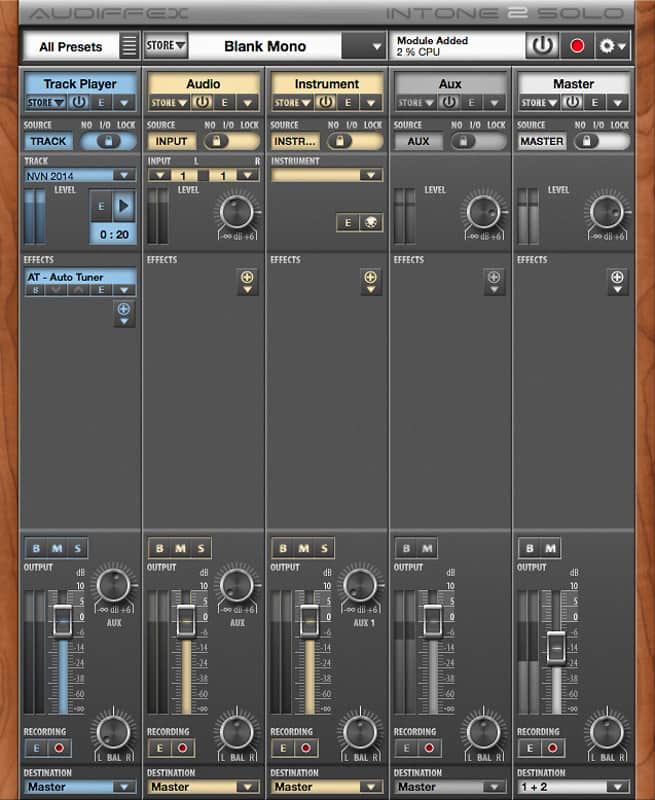
Unique layout and workflow that aims to inspire. inTone 2 Solo is not limited in its functionality, but only in track numbers. inTone 2 Solo features almost 40 FX plugins, one track player, one audio track one instrument track, one AUX and one master chain.
It's up to you! inTone can be anything. It is a simple jamming tool as well as sophisticated playback machine. It is a live production mixer that processes multiple audio inputs with studio plug-ins, plays audio files and virtual instruments, with the ability to change a track, effect or instrument configuration in no time! It is also a multitrack recorder, but you can make it something completely different.
Audio Chains:
inTone allows you to route any of your sound card inputs into any audio chain. Each of them features a gain knob, FX section, volume fader, bypass, mute and solo buttons, AUX sends and an individual recorder. Any chain can be routed to any sound card output or inTone`s Master Chain.
Track Player:inTone Track Player is an advanced MP3/AAC/WAV/AIFF file player. It allows you to create playlists, change speed and tuning of songs and loop the playback. Sound of the tracks can be also altered.
Recorder:inTone allows to record the audio signal of any track at almost any point of the signal path. Record the whole mix, record in the Master Chain or simultaneously record multiple tracks of a live gig to mix them later. You may even record unprocessed audio, or even add a Track Recorder module to any place in the Effect section.
FX Section:Every track features 8 audio effect slots. You can use any of 36 included inTone effects. Their list matches Audified Pedals - including dynamic effects, equalizers, amplifier simulation, filters, etc. You can also enlarge your collection with any Audified plugins - ampLion for guitarists, GK Amplification 2 for bassists, Guitar or Studio Line FX. Also you can use 3rd party VST, DirectX or AudioUnit plugins.
MIDI:To improve live performance comfort inTone can be remotely controlled by any MIDI controller. Connect any MIDI controller and decide, which parameters you would like to control while playing live. Turn knobs, drag faders, switch FX on and off or change presets. Anything you desire is possible.
Compatibility
Mac:
- Mac OS X 10.8 - Mac OS X 10.11.
- Standalone App.
Windows:
- Windows 7 - Windows 10
- Standalone App.
Installation Instructions
General Instructions:
- We auto-detect your computer operating system, so just click the download button above
- Find the downloaded plugin (it’s in your computer’s download folder) and double click it
- A plugin installer window will open, so go through the installation process
- We will also send you an email with a link to re-download in case you need it
How to install plugins in Ableton Live:
- If Ableton is closed, open it and skip to #5
- If Ableton is already open, go to Preferences
- Go to Files & Folder
- Click “Rescan plugins”
- Find the plugin in the Ableton plugins folder in the sidebar
- Drag-and-drop the plugin onto your track at the bottom of the screen
- Open Logic Pro X
- Create a software instrument track if you downloaded a virtual instrument plugin
- Under Default Patch, go to AU Instruments and choose the plugin you just installed
- If you downloaded an effect or utility plugin, you can insert them on the mixer