
Cableguys HalfTime
Price€13.08
Incl. VAT
Instant Download
This gear has sold
See similar gear from other Reverb sellers
Listed:over a month ago
Views:682
Saves:8
Offers:12

Chicago, IL, United States
Our users rate Reverb
Instant creative half-speed effect.
What it is:
Instantaneous half-time effector.
How we use it:
Cut the speed of our track in half with the push of a button.
Why it's cool:
HalfTime is the only plugin dedicated completely to half-speed effects. As a result, it does half-time extremely well, allowing for an array of interesting tweaks.Enter a world of spaced-out, slowed-down sound with HalfTime, the only plugin 100% dedicated to half-speed effects, in use by Armin van Buuren, David Guetta, members of 808 Mafia, The Chemical Brothers and more.
HalfTime transforms any audio into a dark, downtempo version of itself, giving your tracks huge mood and atmosphere. Lead synths mutate into heavyweight EDM bass monsters. Plinky piano lines become haunting trap melodies. Percussion thickens, expanding to reveal new rhythmic possibilities.
Just add the plugin for an instant half-speed effect with zero setup. Or go in deep with powerful creative controls. HalfTime works on loops, virtual instruments or even live audio input, inspiring you in seconds.
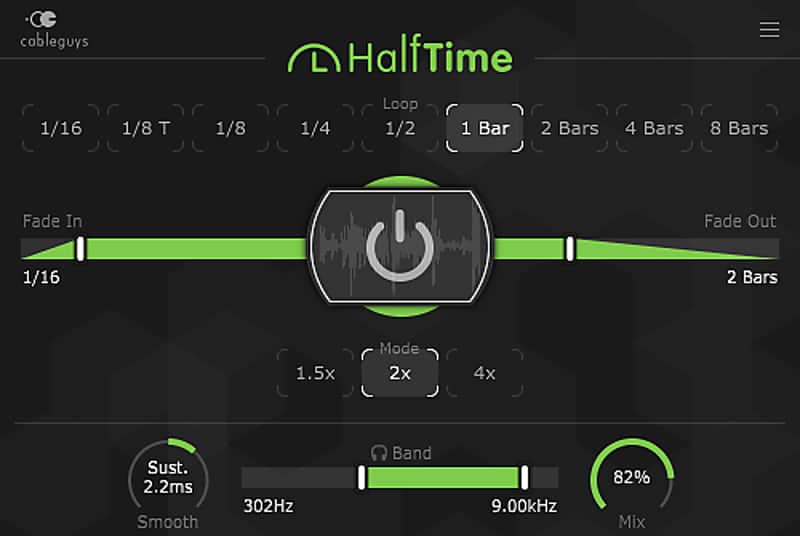
The hands-on Power button makes it easy to fit HalfTime into your tracks — create a rapid switch or sink in slowly with smooth fades up to 16 bars.
Three speed modes give you classic half-speed, tight harmonies and shuffling swing rhythms, and drugged-out quad-time playback. Adjustable Loop length allows multi-bar slow-downs, funky syncopations and totally new grooves.
Slow only the lows, mids or highs with the Band split — generate deep bass movement, fatten midrange percussion, or flip your top-end on its head.
Features:
Compatibility
Windows:
Installation Instructions
Once you download HalfTime, you will receive a license key by email which will then need to be registered at www.cableguys.com
What it is:
Instantaneous half-time effector.
How we use it:
Cut the speed of our track in half with the push of a button.
Why it's cool:
HalfTime is the only plugin dedicated completely to half-speed effects. As a result, it does half-time extremely well, allowing for an array of interesting tweaks.Enter a world of spaced-out, slowed-down sound with HalfTime, the only plugin 100% dedicated to half-speed effects, in use by Armin van Buuren, David Guetta, members of 808 Mafia, The Chemical Brothers and more.
HalfTime transforms any audio into a dark, downtempo version of itself, giving your tracks huge mood and atmosphere. Lead synths mutate into heavyweight EDM bass monsters. Plinky piano lines become haunting trap melodies. Percussion thickens, expanding to reveal new rhythmic possibilities.
Just add the plugin for an instant half-speed effect with zero setup. Or go in deep with powerful creative controls. HalfTime works on loops, virtual instruments or even live audio input, inspiring you in seconds.
The hands-on Power button makes it easy to fit HalfTime into your tracks — create a rapid switch or sink in slowly with smooth fades up to 16 bars.
Three speed modes give you classic half-speed, tight harmonies and shuffling swing rhythms, and drugged-out quad-time playback. Adjustable Loop length allows multi-bar slow-downs, funky syncopations and totally new grooves.
Slow only the lows, mids or highs with the Band split — generate deep bass movement, fatten midrange percussion, or flip your top-end on its head.
Features:
- Instant setup: Add the plugin – get an instant half-speed effect with no further setup.
- Power button: Punch the large central button to activate the effect – automate in your DAW.
- Fade In/Out: Introduce the effect instantly, or fade in gradually, across up to 16 bars.
- 3 speed Modes: 2x for the classic "half-speed" effect. 1.5x for perfect fifth harmonies and triplet rhythms. 4x speed for drugged-out quad-time playback.
- Band Split: Half-speed just the bass, treble or midrange for trippy effects.
- Band Solo: Hear just the slowed frequency range – use it to hone the effect, as a filter, or to blend using the Mix control.
- Dry/Wet Mix: Blend the original and slowed audio.
- Loop Length: Set the Loop from 1/16 up to 8 bars – keep the original timing, stretch it to half speed, or create catchy new rhythms.
- Smooth: Preserve transient punch with Percussive mode, and avoid clicks and pops on sustained material with Sustain mode. Or push it to extremes with creative FX and Swell options.
Compatibility
Windows:
- 2 GHz CPU with SSE2 support
- Windows 7, 8 or 10
- VST host sequencer
- 32- or 64-bit
- 2 GHz Intel CPU
- Mac OS X 10.8 or later
- VST or AU host sequencer
- 32- or 64-bit
Installation Instructions
Once you download HalfTime, you will receive a license key by email which will then need to be registered at www.cableguys.com
- If Ableton Live is closed, open it and skip to #5.
- If Ableton Live is already open, go to Preferences.
- Go to Files & Folder.
- Click "Rescan plugins".
- Find the plugin in the Ableton plugins folder in the sidebar.
- Drag-and-drop the plugin onto your track at the bottom of the screen.
- Open Logic Pro X. Newly installed plugins should be detected automatically every time Logic is opened.
- If you've downloaded an effect or utility plugin, these can be used on an insert for any track in the mixer.
- Create a software instrument track if you downloaded a virtual instrument plugin.
- Under Default Patch, go to AU Instruments and choose the plugin you just installed.
- Go to the Reverb SYNC Software and plugin Collection.
- Choose your desired plugin.
- Reverb will auto-detect your platform, so simply click the download button.
- Continue the installation process by following the prompt.
- Hover your mouse over the smart control button.
- Click Show Inspector icon.
- Click on plugins and choose your desired plugin.